
If the volume buttons on your Vizio TV remote are not working, the cause is usually a stuck or dirty button, weak batteries, a remote that needs a reset, or a soundbar or HDMI-CEC setting that is taking over volume control. Start by removing the batteries, pressing every button a few times, putting in fresh batteries, and restarting the TV. That simple routine fixes most cases in under five minutes.
If it does not, this guide walks you through every other fix in the right order, from a quick phone camera test to re-pairing a voice remote, checking the TV Speakers setting, and knowing when the remote is simply worn out.
Quick Overview
| What You Notice | Most Likely Cause | Fix to Try First |
| Only volume and mute do nothing, other buttons work | Dirty or worn button contacts, or volume routed to a soundbar | Clean or unstick the buttons, then check TV Speakers and CEC settings |
| No buttons work at all | Dead batteries or a frozen remote | Fresh batteries plus a remote discharge reset |
| Volume changes slowly or only sometimes | Weak batteries, blocked sensor, or worn contacts | New batteries, clear the path to the TV sensor, phone camera test |
| Volume goes up or down by itself | A stuck Volume Up or Volume Down button | Remove batteries and press each button firmly several times |
| Volume works on the TV but not from the remote | Remote problem, not a TV problem | Remote reset, re-pair (voice remote), or replace the remote |
| Volume bar shows on screen but sound does not change | Audio is going to a soundbar or receiver | Use HDMI ARC, turn on CEC, or set TV Speakers to On |
Why Are the Volume Buttons on My Vizio Remote Not Working?
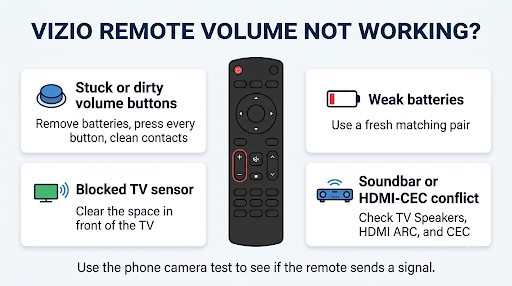
Vizio remote volume buttons usually stop working because of a physical issue with the button, a power issue with the remote, or a setting that sends volume commands somewhere other than the TV speakers. Volume Up and Volume Down are some of the most pressed buttons on any remote, so they wear out and collect dirt faster than the rest.
Here are the most common causes:
- Stuck or dirty buttons: Crumbs, dust, or sticky spills can keep the rubber pad from making contact. A button stuck in the pressed position can also stop other buttons from working. If several buttons are dead and only a few respond, our guide on a Vizio TV remote that is not working but the power button works covers that pattern in more detail.
- Weak or dead batteries: Low batteries can let some buttons work while others respond slowly or not at all.
- Temporary glitch in the remote or TV: Both can freeze up and need a reset or power cycle.
- Blocked TV sensor: A soundbar, decor, or a cabinet door in front of the TV can block the infrared signal.
- Lost pairing on a voice remote: Newer Vizio voice remotes connect over Bluetooth and can drop their connection, especially after a battery change.
- Soundbar, receiver, or HDMI-CEC conflict: When audio goes through an external device, the TV may pass volume commands to that device, or ignore them if the connection is not set up correctly.
- Worn internal contacts: On older remotes, the conductive pads under the volume buttons can wear down until a reset no longer helps.
Is It the Remote or the TV? Run These Two Quick Tests
Before you start resetting things, figure out whether the problem is the remote or the TV. It saves a lot of time.
Test 1: Use the Phone Camera to Check the Remote Signal
- Open the camera app on your smartphone.
- Point the front tip of the Vizio remote at the camera lens.
- Press and hold Volume Up, then Volume Down.
- Look at your phone screen for a flashing light at the tip of the remote.
If you see a flash when you press other buttons but not when you press volume, the volume button contacts are the problem. If you see a flash for volume too, the remote is sending a signal and the issue is more likely the TV sensor, a setting, or a soundbar. If nothing flashes at all, start with the batteries and a remote reset.
Pro Tip! Some phone rear cameras filter out infrared light. If you see no flash with any button, try the front selfie camera before you assume the remote is dead.
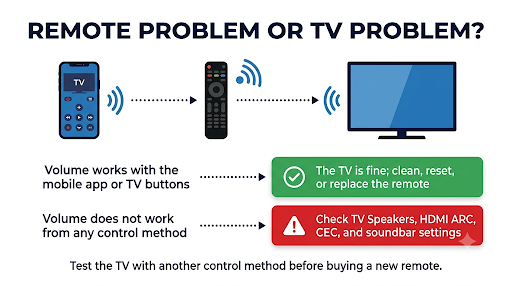
Test 2: Try the Volume Buttons on the TV or the VIZIO Mobile App
Press the physical volume control on the TV, or use the volume controls in the VIZIO Mobile app. If the volume changes, your TV and speakers are fine and the remote is the problem. If the volume does not change from the TV or the app either, focus on the audio settings and soundbar fixes later in this guide.
How Do You Fix Vizio TV Remote Volume Buttons Not Working?
Work through these fixes in order. The first few are quick and solve the problem for most people.
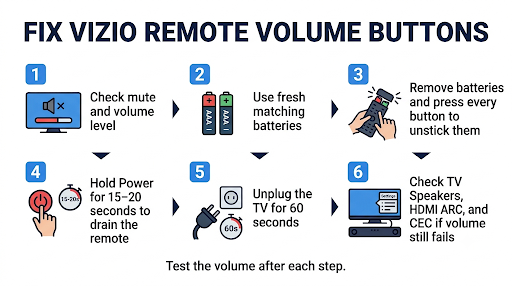
1. Check That the TV Is Not Muted or Set Too Low
Press Volume Up and watch for the volume indicator on screen. If the number goes up, the remote is working and the issue is sound output. Press Mute once to make sure the TV is not muted, and check that the volume is not sitting near zero.
2. Replace or Reseat the Batteries
Weak batteries are the most common reason a Vizio remote stops responding. Remove the batteries and put in a fresh pair from a new pack. Make sure the + and – ends match the markings inside the battery compartment.
Important Point to be Considered! Old batteries can still power some buttons while others fail. “They still work for the power button” does not mean the batteries are good. Always test with brand-new batteries.
3. Unstick and Clean the Volume Buttons
With the batteries out, press Volume Up, Volume Down, and Mute firmly 10 to 15 times each. Then press every other button at least once. Lightly tap the remote against your palm to shake loose any crumbs. Wipe the buttons and the remote’s front tip with a soft, dry cloth.
For sticky buttons, lightly dampen a cotton swab with isopropyl alcohol and clean around the edges of the volume buttons. Let it dry fully before putting the batteries back.
4. Do a Remote Discharge Reset
A discharge reset clears leftover power and small glitches from the remote. Here is how to do it:
- Remove both batteries from the remote.
- Press and hold the Power button for about 15 to 20 seconds.
- Release it, then press each button on the remote once, including both volume buttons.
- Insert fresh batteries and test the volume.
5. Power Cycle the Vizio TV
Sometimes the TV is the one that froze, not the remote. A full power cycle clears temporary software glitches.
- Turn off the TV and unplug the power cord from the wall.
- Press and hold the physical power button on the TV for about 15 seconds to drain leftover power.
- Wait about a minute, then plug the TV back in and turn it on.
If your remote still partly works, you can also run a Soft Power Cycle from the menu. On many SmartCast models, the path is Menu > System > Reset & Admin > Soft Power Cycle. On many newer models, it is Menu > Admin & Privacy > Soft Power Cycle or Restart TV. Menu names vary by model and software version.
6. Clear the Path to the TV’s Remote Sensor
Standard Vizio remotes use infrared, which needs a clear line of sight. Move anything sitting in front of the bottom edge of the TV, like a soundbar, a game console, or decor. Wipe the sensor area on the TV with a dry cloth. Point the remote straight at the TV and stay within a normal viewing distance while you test.
Pro Tip! A soundbar placed directly under the screen is one of the most common hidden blockers. If the volume works when you hold the remote higher, the sensor is being partly blocked.
7. Re-Pair a Vizio Voice Remote
If you have a Vizio voice remote (the one with a microphone button), it connects to the TV over Bluetooth and may need to be paired again, especially after a battery change.
- Turn on the TV.
- Open Menu > System > Voice Remote > Pair New Remote. On some models this is under All Settings or Admin & Privacy.
- Press and hold the Microphone and Mute buttons together for about 5 seconds, until the light on the remote starts blinking.
- Keep the remote close to the TV and follow the on-screen prompts until you see that pairing is complete.
If your remote cannot open the menu, use the physical buttons on the TV to get there. The exact button combination can vary by remote model, so if the TV shows different instructions on screen, follow those. If the TV never finds the remote, work through these fixes for a Vizio SmartCast remote not pairing before you buy a new one.
8. Check the TV Speakers Setting
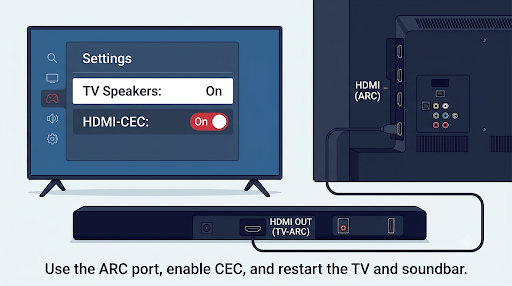
Vizio TVs have a TV Speakers setting in the Audio menu. If it was turned off when you used a soundbar or headphones, the remote may change the volume number while you hear nothing from the TV. Open Menu > Audio and set TV Speakers to On or Auto. The exact location varies by model.
If you recently used Bluetooth headphones on a model that supports them, make sure audio has been switched back to the TV speakers.
9. Fix Soundbar, Receiver, and HDMI-CEC Conflicts
If you use a soundbar or AV receiver, the Vizio remote does not change the TV speaker volume. It sends the command to the soundbar through HDMI-CEC. When that link breaks, the volume buttons seem dead.
- Use the right HDMI port: Connect the soundbar to the TV port labeled HDMI ARC or HDMI eARC.
- Turn on CEC: Find the CEC setting in the TV menu (often under System) and make sure it is enabled. Try turning it off and back on to refresh the connection.
- Restart in the right order: Many users find the link works better when the soundbar is on before the TV powers up.
- Try the soundbar’s own remote: If the soundbar remote changes the volume, the soundbar is fine and the issue is the CEC link.
- Using optical? An optical cable does not carry CEC, so the TV remote usually cannot control the soundbar volume over it.
Important Point to be Considered! CEC between different brands, like a Vizio TV with a Samsung or Sonos soundbar, can be inconsistent. If volume control stops working every time the TV turns off and on, check for a firmware update on both the TV and the soundbar. This CEC handshake problem is not unique to Vizio, and the same checks apply when a Samsung TV remote is not controlling the soundbar.
10. Check Your Streaming Device Remote Setup
If you are actually pressing volume on a Roku, Fire TV, Apple TV, or cable box remote, the Vizio remote is not involved at all. Those remotes control the TV volume through their own IR or CEC setup. Open the streaming device’s settings and run its TV or equipment control setup again.
11. Update the Vizio TV Software
An update can fix remote and audio bugs. Go to Menu > System > Check for Updates, or Menu > Admin & Privacy > Check for Updates on newer models. Keep the TV connected to Wi-Fi and do not unplug it while an update installs.
12. Clean the Contacts Inside the Remote or Replace It
If the camera test shows no signal from the volume buttons only, the contacts under those buttons are likely dirty or worn. People comfortable with small repairs can open the remote, clean the circuit board and rubber pads with isopropyl alcohol, and let everything dry. Be aware that opening the remote can break plastic clips.
If cleaning does not help, the simplest fix is a replacement remote. Look up your TV model number (on the label on the back of the TV) and order a compatible remote from Vizio or a trusted retailer.
Why Does Volume Work on the TV But Not on the Remote?
If the TV’s physical buttons or the VIZIO Mobile app can change the volume but the remote cannot, the problem is almost always the remote itself. Weak batteries, a stuck button, worn contacts, or a lost pairing on a voice remote are the usual causes. Run the discharge reset, re-pair if you have a voice remote, and replace the remote if the volume buttons still do not send a signal in the camera test.
Why Does My Vizio Remote Change the Volume So Slowly?
Slow or delayed volume changes usually mean weak batteries, a partly blocked sensor, or worn button contacts. If the volume moves normally from the buttons on the TV but crawls from the remote, the remote is struggling to send a clean signal. Fresh batteries and a clear line of sight fix this most of the time. If it keeps happening, the contacts under the volume buttons are wearing out.
Why Does My Vizio TV Volume Change by Itself?
A Vizio TV volume that keeps going up or down on its own is often caused by a stuck Volume Up or Volume Down button. The remote keeps sending the command even when you are not touching it. Remove the batteries and see if the problem stops. If it does, clean and unstick the buttons. If the volume still changes with the batteries out, check other connected devices, like a streaming stick or cable box remote, that can control the TV through CEC.
What Does a Blinking Light on the Vizio Remote Mean?
On a Vizio voice remote, a blinking light usually shows the remote is in pairing mode or trying to connect. If it blinks when you press volume but the TV does not respond, the remote may have lost its pairing or the batteries may be low. Put in fresh batteries and pair the remote again. Vizio does not publish a full guide to every light pattern, so if the blinking continues after these steps, contact Vizio support with your remote model.
How Do You Change the Volume on a Vizio TV Without the Remote?
You can use the physical buttons on the TV or the free VIZIO Mobile app.
- Physical buttons: Most Vizio TVs have a small set of buttons on the back, near the lower left or lower right edge. Run your fingers along the back edge to find them. Some newer models have only a single power button, which may not adjust volume.
- VIZIO Mobile app: Download the VIZIO Mobile app for iPhone or from the Google Play Store, connect your phone to the same Wi-Fi network as the TV, and pair it. You can then raise, lower, or mute the volume from your phone.
The app is also a great backup while you wait for a replacement remote.
Common Mistakes That Keep the Volume Buttons From Working
| Mistake | Why It Causes Trouble | What to Do Instead |
| Testing with old batteries from a drawer | They may be too weak for a clean signal | Use new batteries from a fresh pack |
| Pressing harder on the volume button | Worn contacts get worse with force | Clean or unstick the button instead |
| Factory resetting the TV first | Erases apps, settings, and Wi-Fi for a problem that is often the remote | Do the camera test and remote reset first |
| Ignoring the soundbar | Volume commands may be going to the soundbar through CEC | Check HDMI ARC, CEC, and the TV Speakers setting |
| Buying any universal remote | Some will not support every Vizio feature | Match the remote to your TV model number |
When Should You Replace the Vizio Remote?
Replace the remote if the volume buttons still show no signal in the phone camera test after fresh batteries, a discharge reset, and cleaning. You should also replace it if the remote was dropped, got wet, or has cracked or loose buttons. A factory reset of the TV is the very last step, and it only makes sense when the TV itself will not respond to volume from any source, including its own buttons and the app.
You can find manuals, model-specific steps, and replacement options on VIZIO Support.
Frequently Asked Questions
Why is my Vizio TV remote not working even with new batteries?
If new batteries do not help, the remote probably needs a discharge reset, has a stuck button, or has lost its pairing if it is a voice remote. Also make sure the batteries are seated correctly and the springs in the battery compartment are clean and not bent.
Why do Vizio TVs not have volume buttons?
Most Vizio TVs do have physical buttons, but they are hidden on the back or along the lower edge to keep the front of the TV clean. Some models have only one power button, so the remote or the VIZIO Mobile app is the main way to control volume.
How do I reset the volume on a Vizio TV?
There is no separate volume reset. Unmute the TV, press Volume Up, and check that TV Speakers is turned on in the Audio menu. If the audio settings are badly mixed up, you can reset picture and audio settings from the menu on many models, which is far less drastic than a full factory reset.
Does a Vizio remote have a pairing button?
Standard Vizio IR remotes do not need pairing. Voice remotes do not have a single pairing button. Instead, you hold a button combination, usually Microphone and Mute, while the TV is in Pair New Remote mode.
Will any Vizio remote work with my Vizio TV?
Many Vizio remotes share the same basic commands, but not every remote supports every feature on every TV. Voice features in particular depend on the TV model. Check compatibility with your exact TV model number before you buy.
Where can I find the Vizio remote control manual PDF?
Go to VIZIO Support and search for your TV model number. The user manual for your TV includes a page showing each remote button and what it does, plus remote troubleshooting steps.
Final Recommendation
Start simple. Put in fresh batteries, unstick the volume buttons, do a remote discharge reset, and power cycle the TV. Then use the phone camera test to see if the remote is sending a signal. If it is, check the TV Speakers setting and your soundbar’s HDMI ARC and CEC connection. If it is not, re-pair your voice remote or replace the remote. In the meantime, the VIZIO Mobile app gives you full volume control from your phone, so you are never stuck without sound.