
If your TCL Roku TV remote light is not flashing when pairing, the cause is usually weak batteries, the wrong pairing method for your remote type, or a remote that does not pair at all. Start with fresh batteries, then hold the pairing button (or Back + Home) for 3 to 5 seconds and watch the status light.
Below, you will learn how to tell which remote you have, the right way to put it into pairing mode, and what to do when the light stays dark, stays solid, or flashes but never connects.
Quick Overview
- Check your remote type. No voice button and no pairing button usually means an IR remote with no pairing light at all.
- Install fresh batteries (or fully charge a rechargeable remote) and match the + and – marks.
- Restart the remote: remove the batteries, press any two buttons, then put the batteries back.
- Power cycle the TV: unplug it, wait, plug it back in, and wait for the Home screen.
- Enter pairing mode: hold the pairing button, or Back + Home on remotes without one, for about 5 seconds until the light flashes.
- Stay close to the TV and wait 30 to 40 seconds for the pairing message.
- Still no light? Use the Roku mobile app to control the TV and look into a replacement remote.
Why Is My TCL Roku TV Remote Light Not Flashing When Pairing?
The most common reason is low or dead battery power. A remote can still send some button presses on weak batteries but not have enough power to light the status LED and start pairing.
Here are the usual causes, from most to least likely:
- Weak, dead, or wrongly installed batteries. TCL says that if you see no flashing light, the batteries may be weak or installed incorrectly, or the remote may be defective.
- You have a simple IR remote. These remotes do not pair, so they have no pairing light to flash.
- You are using the wrong button combination. Some remotes use a pairing button, others use Back + Home.
- The remote is “stuck.” Leftover charge or a frozen chip can stop it from responding until you drain it.
- A button is jammed. A stuck Volume, Mute, or Home key can block pairing mode.
- The remote is faulty. Drops, spills, and battery corrosion can kill the LED or the radio inside.
Which TCL Roku TV Remote Do You Have?
You need to know your remote type before you troubleshoot, because only voice and enhanced remotes have a pairing light. TCL Roku TVs ship with either a standard IR remote or a wireless (voice or enhanced) remote, depending on the model.
| Remote type | How to spot it | Does it pair? | How to enter pairing mode |
| Simple IR remote | No microphone or magnifying glass button, no pairing button | No | Not needed. Point it straight at the TV. |
| Enhanced or voice remote with pairing button | Small recessed button inside the battery compartment | Yes | Hold the pairing button 3 to 5 seconds |
| Voice remote without pairing button | Has a voice button but no pairing button under the cover | Yes | Hold Back + Home for about 5 seconds |
| Roku Voice Remote Pro (rechargeable) | Charging port, no batteries, pairing button on the back | Yes | Hold the pairing button about 5 seconds, or Back + Home |
Important Point to be Considered! If your remote has no voice button and no pairing button, a light that does not flash is normal. TCL notes that a remote without a pairing button may be an infrared remote that does not need to be paired. In that case, skip pairing and jump to the IR fixes further down.
How Do You Fix a TCL Roku TV Remote That Won’t Flash When Pairing?
Work through these fixes in order. Most people get the light flashing by step 3 or 4.
1. Replace or Recharge the Batteries
Put in a brand-new pair of batteries of the same type, and check that the + and – ends match the markings in the compartment. Do not mix one old and one new battery.
TCL’s own steps say that if the light does not flash, try the pairing button again, and if it still does not flash, replace the batteries and repeat.
- Check the metal contacts for white or green corrosion. Wipe them gently with a dry cloth or cotton swab.
- On a new remote, look for a plastic pull tab or film on the batteries.
- If you have a Roku Voice Remote Pro, charge it with a USB cable and a wall adapter. Roku says the status light flashes slowly while charging and turns solid when it is done.
Pro Tip! “New” batteries from a drawer can already be drained. If you can, test with a fresh pack, or borrow batteries from a device you know works.
2. Restart (Drain) the Remote
A remote that has frozen often comes back once you clear its leftover power. Roku’s official method is simple:
- Remove both batteries.
- Press any two buttons. Many users hold the power button for 15 to 30 seconds to fully drain it.
- Put the batteries back in, negative end first.
3. Power Cycle Your TCL Roku TV
The TV also needs to be ready to listen for the remote. TCL recommends a full power cycle:
- Unplug the TV’s power cord from the wall outlet.
- Press and hold the physical power button on the TV for about 15 seconds.
- Plug the TV back in and wait for the Home screen to load completely.
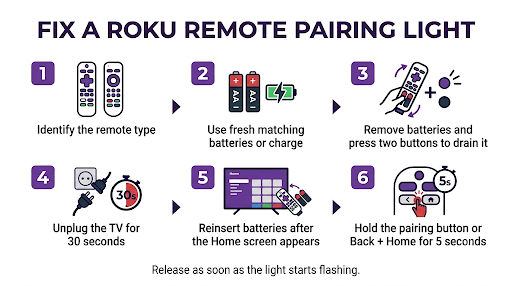
4. Use the Correct Pairing Sequence
Timing matters here. The TV looks for a new remote right after it starts up, so do the steps in this order:
- Remove the batteries from the remote.
- Restart the TV (unplug it or use the TV’s power button).
- When the Home screen appears, put the batteries back in.
- Within about 30 seconds of seeing the Home screen, hold the pairing button for 3 to 5 seconds. If your remote has no pairing button, hold Back + Home for about 5 seconds.
- Release the buttons as soon as the status light starts flashing.
- Keep the remote close to the TV and wait 30 to 40 seconds for the pairing message to appear on screen.
Important Point to be Considered! Do not keep holding the buttons for too long. Holding the pairing button or Back + Home for around 20 seconds is Roku’s method for resetting the remote, not pairing it. Let go once the light flashes.
If the light now flashes but the TV still will not connect, our full guide on fixing a TCL Roku TV remote that is not pairing walks through the deeper connection fixes.
5. Check for Stuck or Jammed Buttons
Press every button once, firmly, and feel for any that stay down or feel spongy. A button held down by grime, a phone case, or a couch cushion can stop the remote from entering pairing mode. Clean around the keys with a slightly damp cloth (never soak the remote).
6. Reset the Remote, Then Pair Again
If the light still won’t flash after fresh batteries, try Roku’s remote reset:
- Hold the pairing button for 20 seconds. If there is no pairing button, hold Back + Home for 20 seconds.
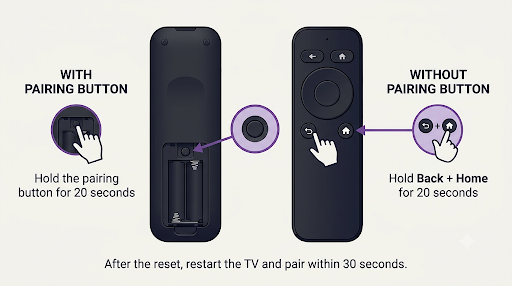
- Wait for the light on the remote to stop flashing.
- Recharge the remote if it is rechargeable.
- Restart the TV and run the pairing sequence from step 4.
7. Pair From the TV Menu
If you have the Roku mobile app or a second working remote, you can put the TV into pairing mode first. Go to Settings > Remotes & devices, then choose the option to pair or add a new device and select Remote. Menu names can vary slightly by Roku OS version. Then put your remote into pairing mode while the TV is searching, because both have to be in pairing mode at the same time.
8. Remove Interference and Other Remotes
Wireless remotes can get confused when other remotes or devices are nearby.
- Take batteries out of any old Roku remotes in the room. Roku also lets you disable an unused remote by holding Back + Home + Mute for 5 seconds.
- Move the remote within a few feet of the TV for pairing.
- Keep metal objects, soundbars, and routers from sitting directly in front of the TV.
9. Use the Roku Mobile App While You Troubleshoot
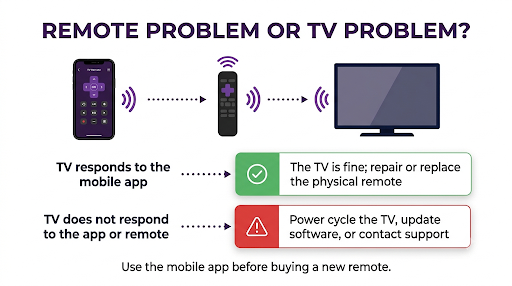
The free Roku mobile app works as a remote, so you are not stuck without control. Connect your phone to the same Wi-Fi network as the TV, open the app, select your TCL Roku TV, and use the remote feature. TCL says that if the TV responds to the app but not the physical remote, the remote itself is likely the problem.
How Do You Pair a TCL Roku TV Remote Without a Pairing Button?
Press and hold the Back and Home buttons together for about 5 seconds until the status light flashes, then wait for the pairing message on the TV. This works on Roku voice remotes that do not have a pairing button under the battery cover.
If your remote has no pairing button and no voice button, it is an IR remote. It does not pair and has no pairing light, so pressing Back + Home will not make anything flash.
What If Your Simple IR Remote Shows No Light at All?
An IR remote uses invisible infrared light, so you will not see anything with your eyes even when it works. TCL says IR remotes must point directly at the front of the TV to work reliably.
Try this quick phone camera test:
- Open your phone’s camera app (the front camera often works best).
- Point the remote’s tip at the camera lens.
- Press and hold the power button.
- If you see a flicker or glow on your phone screen, the remote is sending a signal. If not, try fresh batteries, then replace the remote.
If the remote passes this test but the TV still ignores it, the issue is usually on the TV side. See what to do when your TCL TV remote works but the TV does not respond.
Why Is the Light Not Flashing After Changing the Batteries?
If the light still does not flash after you install new batteries, the remote usually needs a drain and a fresh pairing sequence, not more batteries. Here is what to check:
- Battery orientation: one battery flipped the wrong way is enough to stop the LED.
- Battery quality: cheap or old batteries can read as “new” but still be weak.
- Contacts: bent springs or corrosion stop power from reaching the board.
- Timing: put the batteries in only after the TV reaches the Home screen, then pair within about 30 seconds.
If none of that works, the LED or the remote’s internal radio has likely failed.
What Does a Solid Light or Nonstop Flashing Mean?
A light that turns solid or keeps flashing means the remote has power but is not finishing the connection with the TV.
- Light flashes, then stops, and nothing happens: the TV was not ready. Restart the TV and pair within 30 seconds of the Home screen.
- Light keeps flashing forever: the remote is in pairing mode but the TV is not finding it. Move closer, remove other remotes, and try pairing from the TV’s Remotes & devices menu.
- Light stays solid: often a stuck remote. Remove the batteries, drain it, and try again. If it keeps happening, the remote may be faulty.
- Light blinks several times when you press a button: the remote is working but is not paired, so re-pair it.
Pro Tip! An enhanced or voice remote that is not properly paired can drain new batteries in just a few days, according to TCL. If you keep replacing batteries, re-pairing usually fixes it.
Is It a TCL Roku TV, or a Different TCL Platform?
These steps only apply to TCL TVs running Roku. Check the remote: a Roku remote has the purple directional pad and Roku branding. TCL also sells Google TV, Android TV, and Fire TV models, and their remotes pair in completely different ways.
- For Google TV or Android TV models, see how to fix a TCL Android TV remote when Home and OK pairing is not working.
- For Fire TV models, follow our guide on a TCL Fire TV remote that will not pair during setup.
Common Mistakes That Stop the Pairing Light From Flashing
- Trying to pair a simple IR remote that has no pairing feature.
- Holding the pairing button for 20 seconds or more, which resets the remote instead.
- Pressing Back + Home on a remote that actually has a pairing button inside the battery cover.
- Pairing before the TV has fully reached the Home screen.
- Pairing from across the room instead of right next to the TV.
- Leaving an old Roku remote with batteries in it nearby.
When Should You Replace Your TCL Roku TV Remote?
Replace the remote if the light never flashes after fresh batteries, a full drain, a TV power cycle, and a remote reset, or if the TV works fine with the Roku mobile app. Those signs point to a hardware failure inside the remote.
When you buy a replacement, make sure it is compatible with your TCL Roku TV model. Roku states its Voice Remote Pro (2nd edition) works with all Roku TV models, and a basic Roku TV IR remote is the budget option. If your TV is still under warranty, contact TCL Support first, since Roku directs Roku TV remote issues to the TV maker.
Frequently Asked Questions
Why is my TCL remote not lighting up at all?
A TCL remote that never lights up usually has dead or misinstalled batteries, or it is an IR remote with no visible status light. Use the phone camera test to see if an IR signal is coming out. If a voice remote shows no light even with new batteries, it is likely faulty.
How long should I hold the pairing button on a TCL Roku TV remote?
Hold it for about 3 to 5 seconds, or until the status light starts flashing, then let go. TCL and Roku both give times in this range. Holding it much longer can trigger a reset instead of pairing.
Can I pair a TCL Roku TV remote without the old remote?
Yes. Restart the TV and, within about 30 seconds of the Home screen appearing, put the new remote into pairing mode. The TV searches for remotes at startup, so you do not need a working remote. You can also use the Roku mobile app to open the Remotes & devices menu.
Does the TCL Roku TV remote light flash differently by Series?
The Series (such as 4-Series or 5-Series) does not change how the light works. What matters is the remote that shipped with your TV: IR models have no pairing light, while voice and enhanced remotes flash during pairing.
Why does my TCL Roku TV remote only turn the TV on and nothing else?
Voice remotes often send power and volume over IR but send navigation over the wireless connection. If only power works, the remote has lost its pairing. Re-pair it using the pairing button or Back + Home.
Is there a TCL Roku TV remote app I can use instead?
Yes. The free Roku mobile app for iPhone and Android controls your TCL Roku TV over Wi-Fi, including navigation, typing, and private listening. Your phone and TV must be on the same Wi-Fi network.
Final Recommendation
Start with the basics: confirm your remote type, put in fresh batteries, drain the remote, and power cycle the TV. Then pair within 30 seconds of the Home screen, holding the pairing button or Back + Home for about 5 seconds and releasing it as soon as the light flashes.
If the light still won’t flash after all nine fixes, use the Roku mobile app for now and replace the remote with a compatible Roku TV remote. Before you buy, check whether your TCL TV is still under warranty, because TCL may replace it for you.