
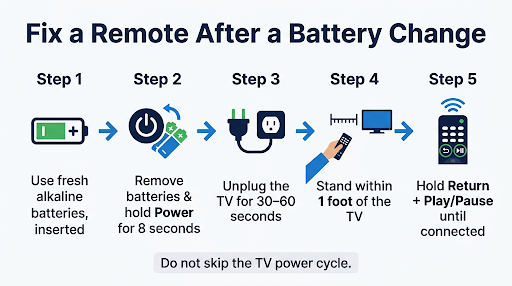
If your Samsung TV remote is not pairing after a battery change, first drain the remote by removing the batteries and holding Power for 8 seconds. Then put the batteries back in, unplug the TV for 30 to 60 seconds, and re-pair from about 1 foot away by holding Return + Play/Pause for 3 to 5 seconds. Most remotes reconnect after this.
Swapping batteries sounds harmless, but it can leave a Samsung Smart Remote half awake, with no clear link back to the TV. This guide shows you how to tell which remote you have, why the swap broke the connection, and exactly which button combo fixes your model.
Quick Overview
- Check the batteries: Right orientation, same brand, brand-new alkaline cells. Don’t mix old and new.
- Drain the remote: Batteries out, hold Power for 8 seconds, wait 10 seconds, batteries back in.
- Power cycle the TV: Unplug it from the wall (and the One Connect Box, if you have one) for 30 to 60 seconds.
- Re-pair: Stand within 1 foot of the TV, aim at the sensor, and hold Return + Play/Pause until a “connected” message appears.
- Test the signal: Point the remote at your phone camera and press Power. No flashing light means a power or hardware problem.
- Still stuck? Reset the remote with the button combo for your model, then pair again.
Which Samsung Remote Do You Have?
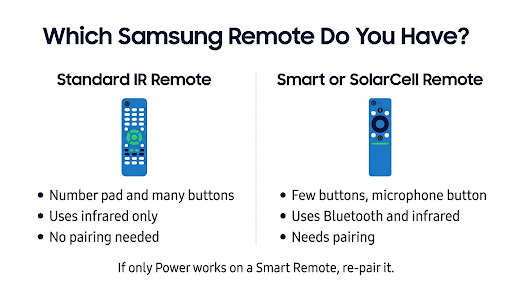
Check your remote type first, because the fix depends on it. Samsung makes two main kinds of remotes, and only one of them actually “pairs.”
| Remote type | How to spot it | How it talks to the TV | Does it need pairing? |
| Standard IR remote (often BN59 or AA59 series) | Lots of buttons, number pad, separate Play and Pause buttons | Infrared only | No. It works automatically once it has power. |
| Samsung Smart Remote (battery) | Slim, few buttons, one combined Play/Pause button, battery door on the back | Bluetooth plus infrared | Yes |
| SolarCell Smart Remote (2021 and newer) | Solar panel on the back, USB-C port on the bottom, no battery door on most models | Bluetooth plus infrared | Yes |
Samsung confirms this split. Remotes with separate Play and Pause buttons pair automatically, while Smart Remotes with a single Play/Pause button need the manual pairing combo. You can see this in Samsung’s guide to connecting a Samsung Smart Remote to your TV.
So if you have a standard IR remote and it “won’t pair,” it isn’t really a pairing problem. It’s a power, contact, or signal problem. Skip to the battery and IR test sections below.
Why Does a Samsung Remote Stop Pairing After New Batteries?
The usual cause is a stuck or confused remote chip, not a broken remote. When the power drops out mid-use, the Bluetooth link to the TV can get cut in a messy way. When fresh batteries go in, the remote doesn’t always reconnect on its own.
Here are the most common reasons, ranked by how often they show up in Samsung support threads and community forums:
- Leftover charge in the remote. The circuits hold a small charge that keeps the remote in a frozen state. Draining it clears the glitch.
- Batteries in the wrong way. It’s easy to flip one cell, especially in a dark room.
- Weak or mixed batteries. A “new” battery from the junk drawer may be half dead. Mixing one fresh cell with one old one causes the same issue.
- Dirty or loose battery contacts. Corrosion or a bent spring can stop current from flowing even with good batteries.
- The TV’s Bluetooth stack is stuck. Samsung TVs don’t fully shut off with the remote. They sit in standby, and the software can freeze until you pull the plug.
- The remote paired with another TV. A Smart Remote only works with one TV at a time. If you have two Samsung TVs, it may have grabbed the wrong one.
- Too far from the TV during pairing. Pairing needs to happen close up, with the remote pointed at the sensor.
How Do You Check the Batteries the Right Way?
Open the battery door and confirm each cell matches the + and – marks inside. Then look closer, because “they’re new” isn’t always enough.
- Use fresh alkaline batteries from a sealed pack. Samsung UK support recommends alkaline batteries and warns against mixing new and used ones.
- Replace both at once. Never leave one old cell in.
- Check the battery size. Most Samsung remotes use AA or AAA cells, depending on the model. Check the compartment or your manual.
- Be careful with rechargeables. Many rechargeable AA and AAA cells run at a lower voltage than alkaline. If your remote acts up only with rechargeables, try a set of alkaline batteries.
- Inspect the contacts. White or green crust means corrosion. Wipe the contacts with a dry cloth or a cotton swab. If a spring looks flat, gently bend it out so it presses firmly against the battery.
Quick tip: Test your “new” batteries in another device you know works, like a flashlight or a game controller. It takes 10 seconds and rules out a dud pack.
How Do You Reset and Re-Pair a Samsung Smart Remote?
Drain it, restart the TV, then pair from close range. Do the steps in this order. Skipping the TV restart is the most common reason pairing keeps failing.
Step 1: Drain the Remote
- Take the batteries out.
- Press and hold the Power button for 8 seconds.
- Wait about 10 seconds.
- Put the batteries back in, checking the orientation again.
Step 2: Power Cycle the TV
- Unplug the TV’s power cord from the wall. If you own a One Connect Box, unplug that too.
- Wait 30 to 60 seconds.
- Plug it back in and turn it on with the physical control button on the TV. This button sits under the bottom center or on the lower right back on most models.
Step 3: Pair the Remote
- Stand within about 1 foot of the TV.
- Point the remote at the remote sensor, usually on the bottom center or lower right of the screen.
- Press and hold Return (Back) and Play/Pause together.
- Keep holding for 3 to 5 seconds, or until you see a pairing or “connected” message on screen.
Samsung’s own Samsung remote troubleshooting page says to hold these buttons for at least 5 seconds within 1 foot of the TV. If pairing fails, it recommends unplugging the TV for 30 seconds and trying again.
What Are the Reset Button Combos for Each Samsung Remote Model?
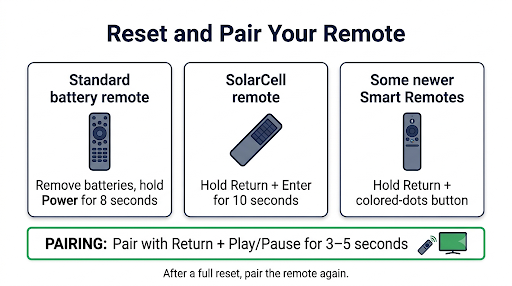
The reset combo changes by remote generation. If the basic drain and re-pair didn’t work, do a full reset with the right combo below, then pair again with Return + Play/Pause.
| Remote | Reset method | Pair method |
| Standard IR remote with batteries | Remove batteries, hold Power for 8 seconds, reinsert | Not needed. Works automatically. |
| Battery Smart Remote (older models) | Remove batteries, hold Power for 8 seconds, reinsert | Return + Play/Pause for 3 to 5 seconds |
| SolarCell Smart Remote (2021 to 2024 TVs) | Hold Return + Enter (center of the navigation pad) for 10 seconds | Return + Play/Pause for 3 to 5 seconds |
| Some newer Smart Remotes | Hold Return + the button diagonally up and right of it (often the four colored dots) | Return + Play/Pause for 3 to 5 seconds |
| 2025 SolarCell Remote | Hold Return + Voice (microphone) for 3 seconds | Return + Play/Pause for 3 seconds |
Important: After any Return + Enter or Return + Voice reset, the remote forgets the TV. You must pair it again, or it will look “dead” even though it’s fine.
Button labels and layouts can differ by country and model year. If a combo doesn’t match your remote, check the model number in the battery compartment or on the back.
How Can You Tell If the Remote Is Sending a Signal?
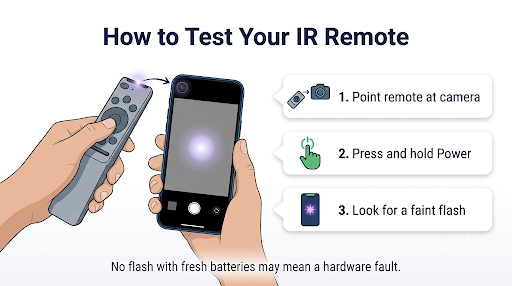
Use your phone camera. Remote infrared light is invisible to your eyes, but most phone cameras can see it.
- Open your phone’s camera app. On many iPhones, the front camera works better because the rear camera filters infrared.
- Point the top of the remote at the lens.
- Press and hold Power while watching the screen.
Here’s what the result means:
- You see a flashing light: The remote has power and is sending IR. The problem is pairing or the TV. Go back to the power cycle and pairing steps.
- You see nothing: The remote isn’t getting power. Try another fresh set of batteries and clean the contacts. If there’s still no light, the remote likely needs replacing.
What If Only the Power Button Works After Changing Batteries?
That’s a classic sign the remote is running on infrared but has lost its Bluetooth pairing. On Smart Remotes, Power often goes through IR, while navigation, Home, and volume rely on the Bluetooth link.
The fix is to re-pair with Return + Play/Pause. If the TV turns on but the arrow keys, Home, or volume still do nothing, our guide on Samsung remote buttons not working while the TV still turns on walks through more button-level fixes.
The same logic applies to the mic. Voice control needs a working Bluetooth connection, so the voice button usually stays dead until pairing succeeds. If pairing works but voice still doesn’t, see this fix for a Samsung TV remote voice button that’s not working.
How Do You Fix a SolarCell Remote That Won’t Pair?
Most SolarCell remotes don’t use replaceable batteries, so “new batteries” usually means a low charge. Charge it first, then reset and pair.
- Charge it with USB-C. Plug a USB-C cable into the port on the bottom. A red LED lights up while it charges and turns off when it’s done. A cable isn’t always included in the box.
- Use light to top it up. Leave the remote solar side up near a window or bright lamp when you’re not using it.
- Remove the plastic film. Brand-new SolarCell remotes sometimes ship with a plastic insulating film at the bottom. Samsung says it must be removed for the remote to work.
- Reset, then pair. Use Return + Enter for 10 seconds (or Return + Voice on 2025 models), then Return + Play/Pause.
Samsung’s guide on how to charge and use the Samsung SolarCell Remote says a full charge can last up to two years, depending on use.
How Do You Check the Remote Battery Level?
Once the remote is paired, you can check its charge from the TV. On many models, go to Settings > All Settings > General & Privacy > Power and Energy Saving > Available Remote Battery. On 2025 models, look under General & Privacy > Remote Control. Menu paths vary by model and software version, and the Remote Control menu only shows up while the remote is paired.
What Other Things Can Block Pairing?
If the core steps fail, these less obvious issues are worth checking:
- Another Samsung TV nearby. If you have more than one Samsung TV, unplug the other one while you pair. That way the remote can’t lock onto the wrong set.
- Blocked sensor. A soundbar, decor, or the TV stand edge can cover the IR sensor. Clear the area below the screen.
- Distance. Pair within 1 foot. After pairing, Samsung recommends staying within about 20 feet (6 m) for normal use.
- Stuck buttons. A sticky button can keep sending a command and block the pairing combo. Press every button firmly a few times to free it.
- SmartThings conflict on 2022 TVs. Samsung notes that on some 2022 (B series) TVs, registering devices in the SmartThings app could disrupt the remote’s IR signal. Turning the TV off and on with its own power button is the suggested first step.
- Outdated TV software. Old firmware can cause pairing and battery display bugs. Update the TV from Settings > Support > Software Update using the TV’s buttons or the SmartThings app.
If your remote pairs but then drops out every few minutes or hours, the issue is different. Check this guide for a Samsung Smart TV remote that keeps disconnecting.
How Can You Control the TV While You Fix the Remote?
Use the SmartThings app on your phone. If your TV is on the same Wi-Fi network as your phone and linked to your Samsung account, the app’s built-in remote lets you navigate menus, run software updates, and change settings.
You can also use the physical control button on the TV for basic tasks like power, input, and volume. It’s slow, but it works when nothing else does.
Common Mistakes to Avoid
- Pairing from the couch. Bluetooth pairing on Samsung remotes is designed to start up close. Walk to the TV.
- Letting go too early. Hold Return + Play/Pause until the on-screen message appears, not just for a quick second.
- Skipping the TV unplug. Turning the TV off with the remote only puts it in standby. Pull the plug.
- Resetting without re-pairing. A full reset wipes the connection. Always pair right after.
- Buying a new remote too soon. If the phone camera test shows a light, the remote is almost always fixable.
When Should You Replace the Remote?
Replace it if the phone camera test shows no light with two different sets of fresh batteries and clean contacts. That points to a hardware failure, often from a drop, liquid, or corrosion damage.
Before you buy, note the model number printed inside the battery compartment or on the back. A matching Samsung remote, or one listed as compatible with your TV model year, is the safest choice. If your TV is still under warranty, contact Samsung support first, since a replacement may be covered.
FAQs
Why won’t my Samsung remote work even with new batteries?
Fresh batteries rule out power, so the issue is usually a frozen remote or TV. Drain the remote by holding Power for 8 seconds with the batteries out, unplug the TV for a minute, then re-pair. If the camera test shows no light, the batteries may be inserted wrong or the contacts may be dirty.
How do I pair a Samsung remote without the TV’s remote working?
You don’t need a working remote to pair. Turn the TV on with its physical control button, then hold Return + Play/Pause on the remote while standing close to the TV. The TV listens for the pairing signal on its own.
Do I need to re-pair my Samsung remote every time I change batteries?
No. Normally the remote reconnects on its own after a battery swap. You only need to re-pair if the remote stops responding, only Power works, or you did a full reset.
Why is the red light on my Samsung remote blinking but nothing happens?
A blinking light means the remote has power and is trying to send a command. If the TV ignores it, the remote is likely unpaired or the sensor is blocked. Re-pair from close range and clear anything in front of the bottom of the screen.
Can a Samsung Smart Remote pair with two TVs?
Not at the same time. A Smart Remote works with one TV at a time, so pairing it to a second TV disconnects it from the first. You’ll need to pair it again each time you switch.
Will a factory reset of the TV fix remote pairing?
It can, but treat it as a last resort. A TV factory reset erases your apps, accounts, and settings. Try the remote reset, TV unplug, and software update first.
Final Recommendation
Start simple. Confirm the batteries are fresh alkaline cells, inserted the right way, then drain the remote with the 8-second Power hold. Next, unplug the TV for a full minute and pair from 1 foot away with Return + Play/Pause until the on-screen message appears.
If that fails, use the reset combo for your remote model and pair again. Run the phone camera test to decide between a pairing problem and a dead remote. Only buy a replacement once the remote shows no IR light with two sets of good batteries.