
If your LG Magic Remote scroll wheel is not working, start with fresh batteries and a full unpair and re-pair. That clears most “wheel does nothing” problems in under two minutes. If the wheel feels loose, sunk, wobbly, or spins without clicking, the issue is physical: usually dirt under the wheel, a slipping rubber ring, or a snapped plastic axle inside the remote.
The good news? A broken scroll wheel rarely means you need a new TV remote right away. This guide walks you through how to tell a pairing problem from a hardware failure, the exact button combos by model year, safe DIY repairs, and what to do if you need to control your TV while you wait for a fix.
Quick Overview
| What You Notice | Most Likely Cause | Best Fix |
| Wheel, pointer, and OK all dead, but power and volume work | Lost pairing (RF/Bluetooth link) | Unpair and re-pair the remote |
| Wheel scrolls but pressing it does not select | Dirty or worn click switch under the wheel | Clean with isopropyl alcohol or contact cleaner |
| Wheel spins freely, skips, or scrolls the wrong way | Slipping rubber ring or dirty wheel sensor | Clean the sensor or glue the rubber ring |
| Wheel sank into the remote or wobbles side to side | Snapped plastic axle (shaft) | Replace the axle or install a scroll wheel kit |
| Wheel stopped working right after a TV update | Software glitch | Power cycle the TV, then re-pair |
Why Is My LG Magic Remote Scroll Wheel Not Working?
The scroll wheel fails for one of two reasons: the remote lost its wireless link to the TV, or a part inside the wheel is dirty, worn, or broken. Figuring out which one you have saves a lot of time.
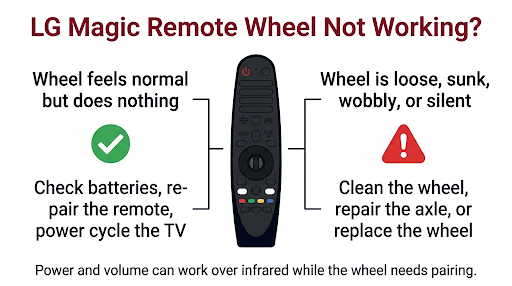
Here is the key detail most guides skip. Your Magic Remote talks to the TV in two ways. Basic buttons like power and volume can still work over infrared. The “magic” features, which include the pointer, voice, and the scroll wheel, run over a radio link (RF or Bluetooth, depending on model). So if power and volume work but the wheel does nothing, the remote is not dead. It just lost its pairing.
Common causes include:
- Weak or dying batteries. The radio features stop first, so the wheel and pointer quit before the power button does.
- Lost pairing. Battery swaps, power outages, and firmware updates can drop the connection.
- Dirt, crumbs, pet hair, or sticky residue under the wheel. This blocks the wheel sensor or the click switch.
- A slipping rubber ring. The grippy outer ring loosens from the hard wheel core, so it spins without moving the sensor.
- A snapped axle. The thin plastic shaft holding the wheel in place breaks. The wheel then sinks, wobbles, or stops clicking.
- A drop. One fall onto a hard floor is enough to crack the axle on many models.
- A TV software glitch, often right after a webOS update.
Is It a Pairing Problem or a Broken Wheel? A 30-Second Test
Run this quick check before you open anything:
- Shake the remote while pointing it at the TV. If no pointer appears, the remote is likely unpaired or the batteries are weak.
- Press the arrow buttons. If they move the menu highlight, the TV is receiving the remote.
- Roll the wheel slowly. Does it feel smooth with soft “notches,” or does it spin freely with no resistance?
- Press straight down on the wheel. Do you feel and hear a crisp click?
- Look at the wheel from the side. Does it sit lower than before or tilt to one side?
If the wheel feels normal but does nothing on screen, start with Fixes 1 to 4. If it feels loose, mushy, sunk, or silent, jump to Fixes 5 to 8.
How Do You Fix an LG Magic Remote Scroll Wheel That Stopped Working?
Fix 1: Replace the Batteries the Right Way
Put in a fresh pair of AA batteries from the same pack. Do not mix an old battery with a new one.
- Check the metal contacts in the battery bay. Wipe off any white or green corrosion with a cotton swab and a little isopropyl alcohol.
- Make sure the springs are pressing firmly against the batteries.
- Rechargeable AAs run at a slightly lower voltage. If the wheel works with alkaline batteries but not rechargeables, that is your answer.
If the remote stopped responding right after you swapped batteries, read our guide on fixing an LG Magic Remote that will not pair after a battery change.
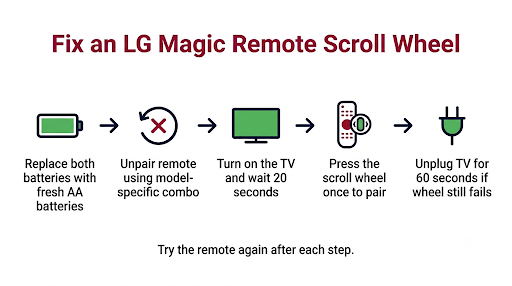
Fix 2: Unpair and Re-Pair the Magic Remote
This is the most effective software fix. LG’s own support pages recommend it whenever the pointer or wheel misbehaves.
- Point the remote at the TV.
- Press and hold the reset combo for your remote (see the table below) for at least 5 seconds.
- Wait for the LED on the remote to blink and an unpairing message to appear on the TV.
- Turn the TV on (or leave it on) and wait about 20 seconds.
- Point the remote at the TV and press the scroll wheel (OK) button once. A pairing confirmation should appear.
| Remote / TV Model Year | Common Remote Model Numbers | Reset or Unpair Combo |
| 2019 and older | AN-MR400, AN-MR500, AN-MR600, AN-MR650A, AN-MR18BA, AN-MR19BA | Hold HOME + BACK for 5 seconds |
| 2020 | AN-MR20GA | Hold BACK + GUIDE for 5 seconds, or hold GUIDE until on-screen instructions appear |
| 2021 and newer | MR21GA, MR22GA, MR23GA, MR24GA, MR25GA | Hold BACK + SETTINGS for 5 seconds. If that fails, hold HOME + SETTINGS for 5 seconds |
Button layouts vary by region, so if a combo does nothing, check the manual for your exact remote. The model number is printed inside the battery cover or on the back of the remote.
Common mistake: pressing the wheel to pair before the TV has fully booted. Give it the full 20 seconds after power-on.
Fix 3: Power Cycle the TV
A frozen TV can ignore wheel input even when the remote is fine.
- Unplug the TV from the wall (not just standby).
- Wait 60 seconds.
- Plug it back in, turn it on, and re-pair the remote.
If the wheel stopped working the same day your TV installed an update, a power cycle plus re-pair usually clears it. Our guide on LG TV remote problems after a software update covers the deeper steps if it keeps happening.
Fix 4: Check for Signal Interference
The Magic Remote’s radio link can be disrupted by things you would not suspect.
- A soundbar sitting in front of the TV’s lower bezel can block the receiver.
- Wi-Fi routers, Bluetooth speakers, or game consoles stacked right next to the TV can cause interference.
- Metal TV cabinets or glass doors can weaken the signal.
Move nearby devices a foot or two away and test the wheel again. Also, if your pointer keeps vanishing or freezing alongside the wheel issue, see our fixes for when the LG Magic Remote cursor is not moving.
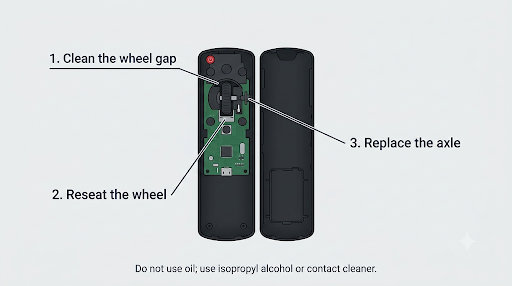
Fix 5: Clean Under the Scroll Wheel (No Disassembly)
When the wheel scrolls in jumps, scrolls backward, or the click feels sticky, dirt is the usual suspect. Try this before opening the remote.
- Remove the batteries.
- Use a can of compressed air to blow around all edges of the wheel while rolling it.
- Dampen a cotton swab or a folded piece of paper with 90% or higher isopropyl alcohol.
- Slide it gently around the wheel gap and roll the wheel back and forth 20 to 30 times.
- Let it dry for at least 10 minutes before putting batteries back in.
Do not use WD-40 or cooking oil. They leave a film that attracts more dust and can damage the rubber. A quick-drying electronic contact cleaner is a safe alternative to alcohol.
Fix 6: Open the Remote and Deep Clean or Reseat the Wheel
If the wheel sank into the remote or stopped clicking, you will need to open the shell. Most Magic Remotes snap together with plastic clips and no screws.
- Remove the batteries.
- Insert a thin plastic pry tool, guitar pick, or old gift card into the seam near the battery end or a bottom corner.
- Work slowly around the edge to release the clips. Go gently. The clips are thin and break easily.
- Lift the top shell and look at the wheel assembly. You should see the wheel, its axle, a small sensor (encoder), and a click switch underneath.
- Clean the sensor and switch with isopropyl alcohol on a swab. Remove any crumbs or hair.
- If the wheel simply popped out of its holder, press it back into place and check that it clicks.
Take a photo before you remove anything so you can put it back exactly the same way.
Fix 7: Repair a Snapped Scroll Wheel Axle
This is the most common hardware failure. The axle is a thin plastic pin that runs through the wheel. When it breaks, the wheel drops, wobbles, or no longer presses down on the click switch.
DIY fixes people use successfully:
- A metal pin from a paperclip cut to the exact width of the wheel. This is the most durable option.
- The thin plastic straw from a spray can (like the one that comes with WD-40) cut to length.
- A trimmed wooden toothpick or matchstick. Easy to work with, but it can wear down over time.
Steps:
- Open the remote as described in Fix 6.
- Remove the wheel and pull out every broken piece of the old axle.
- Cut your replacement pin to match the original length. Measure twice.
- Slide it through the center of the wheel and seat both ends in the holder.
- Test the scroll and click before snapping the shell closed.
Quick workaround if you cannot fix the axle: some owners secure the wheel in place with a small dab of superglue or double-sided tape so it still clicks as the OK button. You lose scrolling, but you can navigate with the arrow keys and still select things.
Fix 8: Glue a Slipping Rubber Ring
On some older remotes, especially the AN-MR400, the rubber ring separates from the hard wheel underneath. The wheel turns under your thumb, but the core does not move, so nothing happens on screen.
The iFixit repair guide for a slipping LG Magic Remote scroll wheel shows how to inject a small amount of glue under the rubber with a syringe at three points around the wheel, then let it dry for about 10 minutes before use. Use very little glue so it does not seep into the sensor.
Fix 9: Install a Scroll Wheel Replacement Kit or Get a New Remote
Third-party scroll wheel replacement kits are sold online for many recent models, including AN-MR21, MR22, MR23, and MR25GA remotes. Many include a pry tool. Quality varies, so read reviews and match the kit to your exact remote model number.
Replace the whole remote if:
- The circuit board or click switch is physically damaged.
- Several buttons besides the wheel are failing.
- Your remote is still under warranty (contact LG first, since opening it may void coverage).
When buying a replacement, check compatibility carefully. LG notes that its 2025 AI Magic Remote works only with 2023, 2024, and 2025 model year TVs, so newer is not always better for an older TV. Genuine replacements are listed on LG’s Magic Remote support page along with official pairing steps.
What If the Wheel Scrolls but the OK Button Will Not Click?
This means the wheel’s rotation sensor is fine but the click switch underneath is not being pressed or is worn out. It is very common on AN-MR18BA, AN-MR19BA, and AN-MR20GA remotes.
Try these in order:
- Clean around the wheel with isopropyl alcohol (Fix 5).
- Open the remote and check if a broken axle is letting the wheel sit too high or off-center (Fix 7).
- Look at the small tactile switch under the wheel. If it is loose or cracked, a replacement kit or new remote is the practical fix.
Because the OK button is built into the wheel on Magic Remotes, a dead click is the most frustrating version of this problem. You can still get by temporarily with the options in the next section.
What If the Scroll Wheel Works but the Pointer Is Missing?
Sometimes the wheel is fine, and the real problem is the pointer hiding. The pointer disappears automatically when you use the arrow buttons. Rolling the wheel up or down or shaking the remote usually brings it back.
If the pointer does not come back, the remote is probably unpaired. Our step-by-step guide on why the LG Magic Remote pointer disappears covers that problem in detail.
How Can You Control Your LG TV While the Scroll Wheel Is Broken?
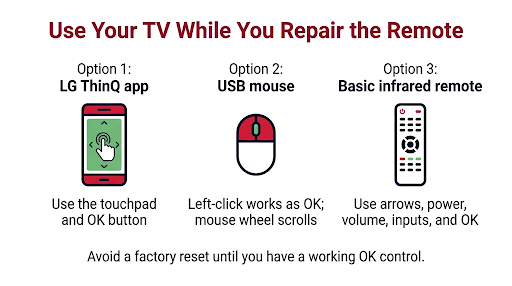
You do not have to wait for a repair to use your TV. Here are reliable temporary options:
- LG ThinQ app. Install it on your phone, connect it to the same Wi-Fi network as your TV, and use its built-in remote with a touchpad and OK button.
- A USB mouse or keyboard. Most LG webOS TVs accept a standard USB mouse. Left-click works as OK, and the mouse wheel scrolls lists. This is a lifesaver if you need to press OK during setup or a factory reset.
- A basic LG infrared remote. It handles power, volume, inputs, arrows, and OK, but no pointer or voice.
- Universal remote or streaming device remote. If you use a Roku, Fire TV, or cable box, its remote can control most of what you watch through HDMI-CEC (called SIMPLINK on LG TVs).
Warning: do not factory reset your TV while the OK button is broken unless you have a backup way to select options. The setup screen asks you to press the wheel to continue, and some owners have gotten stuck there.
Which Fix Should You Try Based on Your Remote Model?
| Remote Model | Most Common Scroll Wheel Issue | Recommended First Fix |
| AN-MR400, AN-MR500 | Slipping rubber ring | Glue the rubber ring (Fix 8) |
| AN-MR600, AN-MR650A | Wheel stuck or not clicking | Open and clean, reseat wheel (Fix 6) |
| AN-MR18BA, AN-MR19BA, AN-MR20GA | Snapped axle, OK not clicking | Replace the axle (Fix 7) |
| MR21GA, MR22GA, MR23GA | Sunk or wobbly wheel | Axle repair or replacement kit (Fix 7 or 9) |
| MR24GA, MR25GA (AI Magic Remote) | Pairing drops, wheel click failure | Re-pair first, then a model-specific kit (Fix 2 or 9) |
These are patterns seen across owner forums and repair communities, not official LG failure data. Always start with batteries and pairing, no matter which remote you have.
How Do You Prevent Scroll Wheel Problems in the Future?
- Press the wheel straight down, not at an angle. Side pressure is what cracks the axle.
- Keep snacks and drinks away from the remote. Sticky residue is the top cause of a mushy wheel.
- Use a silicone remote cover. It cushions drops and keeps crumbs out of the wheel gap.
- Swap batteries before they fully die, so the remote does not keep dropping its pairing.
- Keep your TV software updated through Settings so remote bugs get patched.
Frequently Asked Questions
Can I use my LG Magic Remote without the scroll wheel?
Yes, partly. The arrow keys still navigate menus, and the power, volume, and input buttons work normally. The problem is selecting things, since OK is built into the wheel. The LG ThinQ app or a USB mouse can handle the selecting until you repair or replace the remote.
Why does my LG remote scroll wheel scroll in the wrong direction or skip?
Skipping or reverse scrolling usually means the optical or mechanical sensor next to the wheel is dirty. Cleaning with compressed air and isopropyl alcohol fixes this in most cases. If it continues, the sensor itself may be worn.
Does LG repair Magic Remote scroll wheels under warranty?
LG generally replaces the remote rather than repairing the wheel. If your TV or remote is still under warranty, contact LG support before opening the shell, because DIY disassembly can affect your coverage.
Will a new Magic Remote work with my older LG TV?
Not always. Magic Remotes are tied to specific TV model years. For example, the 2025 AI Magic Remote supports only 2023 to 2025 TVs. Check the compatibility list for your TV model before you buy.
Is it worth fixing the scroll wheel or should I just buy a new remote?
If the problem is dirt or a snapped axle, a DIY fix costs almost nothing and takes 15 to 30 minutes. If you are not comfortable prying open plastic clips, or the click switch is damaged, a genuine replacement remote is the simpler choice.
Why did my LG Magic Remote scroll wheel stop working after I dropped it?
A drop often cracks the thin axle or knocks the wheel out of its holder. If the wheel now sits lower, wobbles, or no longer clicks, open the remote and check the axle. Reseating or replacing it usually brings the wheel back.
Final Recommendation
Start simple. Put in fresh batteries, unpair and re-pair the remote using the combo for your model year, and power cycle the TV. If the wheel still feels normal but does nothing, the issue is software or interference. If it feels loose, sunk, or silent, it is hardware. Clean it first, then repair the axle or install a replacement kit. And if you would rather skip the DIY, check your remote’s model number and buy a genuine LG replacement that matches your TV’s model year. In the meantime, the LG ThinQ app or a USB mouse will keep your TV fully usable.