
If your Vizio SmartCast remote is not pairing, start with fresh batteries and a full TV power cycle. Then go to Menu > System > Voice Remote > Pair New Remote and hold the Microphone and Mute buttons together until the remote light flashes. That fixes most pairing failures in a few minutes.
There’s one catch most guides skip. Not every Vizio remote actually pairs. Standard SmartCast remotes use infrared and never need pairing, so if yours has no microphone button, the fix is different. This guide covers every type, including the older SmartCast Tablet Remote. It also covers what to do when the light won’t flash, the TV never shows a pairing message, or a new remote just won’t connect.
Vizio now calls its TV software VIZIO OS instead of SmartCast, so some menu names differ by model year. If you don’t see the exact label used here, look for the closest match.
Quick Overview
- Check your remote type. A microphone button means a Bluetooth voice remote that pairs. No microphone button means an IR remote that doesn’t pair.
- Install fresh batteries and press every button once with the batteries out to free stuck keys.
- Power cycle the TV. Unplug it, wait at least 5 seconds (a full minute is better), and plug it back in.
- Unpair, then pair again. Menu > System > Voice Remote > Unpair Remote, then Pair New Remote.
- Hold Microphone + Mute for 3 to 5 seconds, close to the TV, until the light flashes.
- Update the remote from the same Voice Remote menu with Check for Update.
- Test the IR signal with your phone camera if nothing works at all.
- Use the VIZIO mobile app as a backup remote while you troubleshoot.
Does Your Vizio SmartCast Remote Actually Need Pairing?
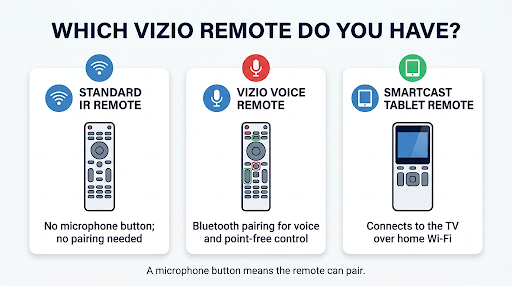
Only Vizio voice remotes and the old SmartCast Tablet Remote need pairing. Voice remotes connect over Bluetooth, which lets them work without pointing at the TV and powers the voice search button. Standard SmartCast remotes connect over infrared (IR), so they work the moment you put batteries in, as long as they can “see” the TV’s sensor.
| Remote Type | How to Spot It | Connection | Needs Pairing? |
| Standard SmartCast remote (for example, XRT136 or XRT140) | No microphone button | Infrared (must point at TV) | No |
| VIZIO Voice Remote (for example, XRT260, XRT270, XRT290R) | Microphone button near the top | Bluetooth for voice, IR for basic buttons on many models | Yes, for voice and point-free control |
| SmartCast Tablet Remote (XR6P, XR6M) | 6-inch Android touchscreen tablet, came with 2016 to 2017 P-Series and M-Series TVs | Home Wi-Fi network | Yes, it connects to the TV over Wi-Fi |
| Universal remote | Third-party brand, device buttons (TV, Cable, etc.) | Infrared | No, it uses a setup code |
Here’s what confuses a lot of people. A voice remote like the VIZIO XRT260 Voice Remote often handles basic buttons like Power and Volume right out of the box. Pairing is what turns on voice control. So if Power works but the mic does nothing, your remote is probably working fine over IR and simply isn’t paired over Bluetooth yet.
Important Point to be Considered! Bluetooth voice remotes only pair with Bluetooth-capable Vizio TVs. VIZIO lists the XRT290R Voice Remote as working with Bluetooth Smart TVs made in 2020 or later. If your TV is older, no button combo will make a voice remote pair. Use a standard IR remote instead.
Why Is My Vizio SmartCast Remote Not Pairing?
Most pairing failures come down to weak batteries, a TV that needs a restart, or the remote being too far away. Less often, the remote is still paired to another TV, its firmware is outdated, or it isn’t compatible with your TV model.
- Weak or wrongly installed batteries. Bluetooth pairing needs more power than a simple button press. Old batteries can light the LED but still fail to pair.
- A TV software glitch. SmartCast can get stuck and stop accepting new connections until it fully restarts.
- Distance and obstructions. VIZIO says the voice remote must be close enough to the TV to pair properly. Pair from a few feet away, not across the room.
- An old pairing in the way. The TV may still hold the previous remote, or the remote may be linked to a second Vizio TV in your home.
- Stuck buttons. A button pressed down under a couch cushion or by sticky residue can block the pairing command.
- Incompatible or third-party remote. Some replacement remotes use a different pairing combo or only support IR.
- The TV is off. A SmartCast TV only accepts a new remote while the screen is on.
How Do You Fix a Vizio SmartCast Remote That Won’t Pair?
Work through these steps in order. Test pairing after each one so you know which fix actually worked.
1. Replace and Reseat the Batteries
Put in a brand-new set of batteries and match the + and – ends to the markings inside the battery cover. While the batteries are out, press and release every button once. This clears any stuck key and drains leftover charge from the remote.
Pro Tip! If your Vizio SmartCast remote is not pairing with new batteries, try a set from a different pack. A “new” battery that sat in a drawer for years can be weak. Also check the metal contacts in the remote for corrosion and wipe them with a dry cloth.
2. Power Cycle the TV the Right Way
A real power cycle clears the TV’s memory. Turning it off with the remote doesn’t do that, because the TV only goes into standby.
- Unplug the TV’s power cord from the wall.
- While it’s unplugged, press and hold the physical power button on the TV for about 10 seconds to drain leftover power.
- Wait at least 5 seconds. Waiting a full minute is even better.
- Plug the TV back in and turn it on with the TV’s own button.
- Remove and reinsert the remote batteries once the TV is fully on, then try again.
If you can reach the menu, a soft power cycle is a quicker option. On many models it’s under Menu > System > Reset & Admin > Soft Power Cycle. Newer models list it as Restart TV or Reboot TV under Admin & Privacy. If pairing still fails after a soft restart, do the full unplug method.
Important Point to be Considered! Only hold the TV’s power button while the TV is unplugged. On many Vizio TVs, holding the Power/Input button for about 12 seconds while the TV is plugged in resets the TV to its default settings and erases your setup. Don’t do that to fix a remote.
3. Unpair the Old Remote and Pair Again
This is the main fix for a Vizio voice remote that won’t connect. You’ll need a way to reach the TV menu. Use the buttons on the TV, the VIZIO mobile app, or the remote itself if its basic buttons still work over IR.
- Turn on the TV and stand within a few feet of it.
- Press Menu (or the gear icon) and go to System.
- Select Voice Remote. On some models it’s listed as Remote Control.
- If a remote is already listed, choose Unpair Remote and confirm.
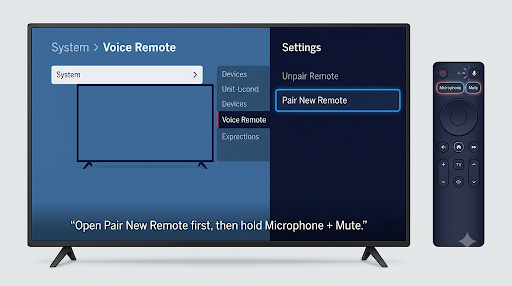
- Select Pair New Remote.
- Press and hold the Microphone and Mute buttons together for 3 to 5 seconds, until the light on the remote starts flashing.
- Release both buttons and wait for the TV to confirm the remote is paired.
- Press the Microphone button and say something simple like “Open Netflix” to test it.
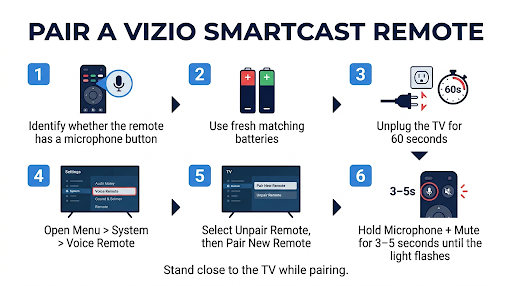
During first-time TV setup, the included voice remote usually pairs on its own. If you skipped that screen or swapped remotes later, the steps above do the same job.
Pro Tip! If your remote has no Mute button, don’t guess at combos. Follow the exact prompt shown on the TV screen when you select Pair New Remote. Third-party replacement remotes often use their own combo. One replacement XRT260-style remote, for example, pairs by holding the Voice and Back buttons. Check the leaflet that came in the box.
4. Update the Voice Remote and the TV
Outdated firmware can stop a remote from pairing or make it disconnect right after. Go to Menu > System > Voice Remote > Check for Update to update the remote. Then go to Menu > System > Check for Updates to update the TV itself. The TV must be online for both.
5. Clear the TV’s Sensor and Test the IR Signal
Even a paired voice remote can rely on IR for some buttons, and a standard remote relies on it completely. Move soundbars, decorations, or cabinet doors away from the front and lower corners of the TV. Keep bright lamps and direct sunlight off the sensor while you test.
Next, check whether the remote is sending a signal at all:
- Open the camera app on your phone.
- Point the front tip of the remote at the camera lens from an inch or two away.
- Press and hold any button and watch the phone screen.
A flickering light on the screen means the remote is sending IR. If you see nothing, try another phone camera, because some cameras filter infrared. No light on either one usually points to a dead remote.
6. Check for Stuck or Damaged Buttons
Press Power, Volume, Input, Menu, and the arrow keys one at a time. A button that feels mushy or doesn’t click back up can jam the remote. It can also cause “ghosting,” where the volume changes or menus open by themselves. Clean around the buttons with a soft, dry cloth. Don’t spray liquid directly on the remote. If only one or two buttons fail, those keys are likely worn. If that’s your situation, our guide on Vizio TV remote volume buttons not working walks through button-specific fixes.
7. Try Another Vizio Remote
Borrow or buy a second Vizio remote and test it. Basic functions work across most Vizio TVs, even if the replacement doesn’t look like your original. If the second remote works, your original remote is the problem. If neither works, the issue is more likely the TV’s sensor, Bluetooth, or software.
What If Only the Power Button Works After Pairing Fails?
If Power still turns the TV on and off, the remote isn’t dead. It’s usually reaching the TV over IR while the Bluetooth link or other functions fail. Unpair and re-pair the voice remote, update it, and check for stuck buttons. For a deeper walkthrough of this exact symptom, see our fix for a Vizio TV remote not working but the power button works.
Why Does My Vizio Remote Light Blink but Won’t Pair?
A blinking light means the remote is in pairing mode, but the TV isn’t picking it up. The most common reasons are that the TV isn’t on the Pair New Remote screen yet, the remote is too far away, or the TV still holds an old pairing.
- Open Pair New Remote on the TV before you hold the button combo.
- Move within a few feet of the TV and hold the remote in front of the screen.
- Unpair any existing remote first, then try again.
- Do a full power cycle, since a stuck Bluetooth stack often ignores new devices.
If the light doesn’t come on at all, the batteries are dead, installed backward, or the remote is faulty.
Why Did My Vizio Remote Suddenly Unpair?
A voice remote that worked for months can drop its pairing after a TV software update, a power outage, or a battery change. The TV may also lose the pairing if it was reset. The fix is the same in each case: unpair the old entry, pair it again, and then run Check for Update in the Voice Remote menu so the remote’s firmware matches the TV’s software.
If it keeps unpairing every few days, put in a new set of batteries from a fresh pack, since weak batteries can make a Bluetooth link drop. Then check for a TV update under Menu > System > Check for Updates. If it still keeps dropping after that, test with a second VIZIO remote to see whether the remote itself is failing.
How Do You Pair a New or Replacement Vizio Remote?
An official VIZIO voice remote like the XRT260 or XRT270 pairs the same way as the original: Pair New Remote on the TV, then hold Microphone and Mute until the light flashes. Its basic buttons usually work over IR before pairing, so you can use them to open the menu.
Third-party replacements are different. Many are IR-only and work right away with no pairing. Others have a mic button but use their own pairing combo. Before you buy, make sure the listing says it supports VIZIO Voice and your TV’s model year, not just “compatible with Vizio.”
Is the Vizio SmartCast Remote Not Pairing to Wi-Fi?
It depends on which remote you have. Standard and voice remotes don’t use Wi-Fi at all. A voice remote talks to the TV over Bluetooth, and a standard remote uses IR. The SmartCast Tablet Remote is the exception, because it connects to the TV through your home Wi-Fi.
If you have the tablet remote and it won’t connect:
- Open the tablet’s Settings and select Wi-Fi. Make sure Wi-Fi is turned on and connected.
- Confirm the tablet and the TV are on the same network. A separate 5 GHz or guest network can stop them from seeing each other.
- Restart your modem and router, then power cycle the TV.
- Restart the tablet and open the SmartCast app again to find the TV.
For voice remotes, Wi-Fi still matters in another way. Voice commands need the TV to be online. If the remote pairs but voice search fails, check the TV’s network connection and restart the router.
Can One Vizio Remote Be Paired to Two TVs?
A Bluetooth voice remote pairs to one TV at a time, but its IR buttons can still control any Vizio TV in range. That’s why one remote sometimes turns on two Vizio TVs in the same room. Both TVs read the same IR signal, so there’s no setting that stops it. The practical fix is to place the TVs so their sensors don’t face the same direction, or use the VIZIO mobile app for the second TV.
If you moved a remote to a new TV, unpair it from the old TV first. Then pair it on the new one using the steps above.
How Do You Use the VIZIO Mobile App as a Remote?
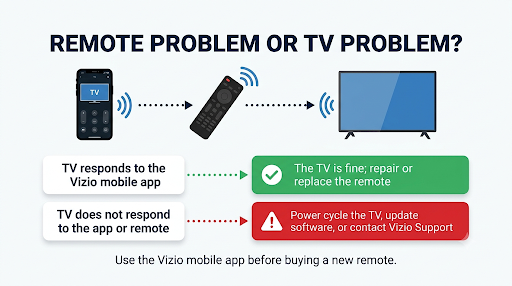
The VIZIO mobile app works as a full remote over your home Wi-Fi, which is handy when your physical remote won’t pair. It also lets you reach the TV’s menu to start the pairing process.
- Download the VIZIO mobile app from the App Store (iOS 16.0 or later) or Google Play.
- Connect your phone to the same Wi-Fi network as the TV.
- Open the app and tap the device selector at the top.
- Select your TV from the list.
- Enter the 4-digit code that appears on the TV screen.
If the TV doesn’t show up, restart your phone, the TV, and your router, then try again. VIZIO’s mobile app page has the current download links.
Pro Tip! Some app features need a free VIZIO account linked to your TV. If the remote screen in the app is greyed out, sign in and link the TV under your account first.
Common Mistakes That Stop a Vizio Remote From Pairing
- Trying to pair an IR remote. If there’s no microphone button, there’s nothing to pair. Focus on batteries and the sensor.
- Holding the combo before the TV is ready. Select Pair New Remote first, then hold Microphone and Mute.
- Turning the TV off with the remote instead of unplugging it. Standby doesn’t clear the glitch.
- Holding the TV’s button too long while it’s plugged in. That can reset the whole TV.
- Pairing from across the room. Get close to the TV during pairing.
- Using a cheap knockoff and expecting voice to work. Many low-cost replacements are IR-only, even if they have a mic icon.
When Should You Replace Your Vizio Remote?
Replace the remote if it shows no IR light on a phone camera with fresh batteries, if a second Vizio remote works on the same TV, or if several buttons are physically damaged. At that point, more resets won’t help.
- Under warranty: Submit a request through VIZIO’s self-service support to ask about a replacement.
- Out of warranty: Buy an official VIZIO remote. Check the product page to confirm it supports your TV’s model year.
- Universal remote: A universal remote can control basic functions using a VIZIO setup code, but it won’t give you VIZIO Voice.
If a second remote also fails and the phone camera test shows a signal, the TV’s IR sensor or main board may be at fault. Contact VIZIO support before buying anything else. A factory reset is the last software step to try, but it erases your apps, Wi-Fi, and picture settings. On older models it’s under Menu > System > Reset & Admin > Reset TV to Factory Defaults. Newer models put it under Admin & Privacy > Reset to Factory Settings. If the TV asks for a PIN and you never set one, try 0000.
Frequently Asked Questions
How do I reset a Vizio Smart TV remote?
Remove the batteries, press and hold the Power button for about 5 seconds, then press every button once to clear stuck keys. Insert fresh batteries and test. For a voice remote, follow that with Unpair Remote and Pair New Remote in the TV’s Voice Remote menu.
Where is the pairing button on a Vizio remote?
There isn’t a dedicated pairing button. Vizio voice remotes enter pairing mode when you hold the Microphone and Mute buttons together. Some replacement remotes use a different combo, so check the remote’s own instructions if Mute is missing.
What are the universal remote codes for Vizio TVs?
Codes depend on the brand and model of your universal remote, so there isn’t one code that works for all. Look up your remote’s brand in VIZIO’s universal remote code list or in the remote’s manual. Point the remote at the TV and press Power after entering a code. If the TV turns off, the code works.
Can I reprogram the buttons on a Vizio remote?
Not on the remote itself. VIZIO doesn’t provide a TV setting for remapping remote buttons, and the app shortcut buttons are set by VIZIO. If you need custom buttons, a programmable universal remote is the practical option, though you’ll lose voice control.
Why is my Vizio TV not connecting to SmartCast?
Your phone and TV are probably on different networks, or the TV’s software needs a restart. Make sure both are on the same Wi-Fi network, power cycle the TV and router, and update the VIZIO mobile app. If the SmartCast home screen won’t load, unplug the TV for a minute and try again.
Can I pair a Vizio TV remote to a Vizio soundbar?
Usually you don’t need to. When the soundbar is connected through HDMI ARC or eARC with CEC turned on, the TV remote’s volume buttons control the soundbar. VIZIO’s 2024 and newer soundbars can also be controlled through the VIZIO mobile app.
Final Recommendation
Start by checking whether your remote has a microphone button. If it does, put in fresh batteries, unplug the TV for a minute, then unpair and re-pair it from Menu > System > Voice Remote while standing close to the screen. If it doesn’t, skip pairing completely and focus on batteries, the sensor, and the phone camera test. If you have the SmartCast Tablet Remote, check that it’s on the same Wi-Fi network as the TV. Use the VIZIO mobile app to keep watching in the meantime. And if a second Vizio remote works where yours won’t, stop troubleshooting and replace the remote.