
If your Vizio TV remote turns the TV on but nothing else works, the problem is usually a stuck button, weak batteries, a frozen TV system, or a remote that lost its pairing or mode setting. In most cases, draining the remote and power cycling the TV fixes it in under five minutes.
The good news is that a working power button tells you a lot. The remote is not completely dead, and the TV is receiving at least some signal. That narrows the cause down fast, so you can skip the guesswork and go straight to the fix that matches your situation.
Quick Overview
| What You Notice | Most Likely Cause | What to Try First |
| Power works, every other button does nothing | Stuck button or TV software hung after waking up | Reset the remote, then unplug the TV for 60 seconds |
| Power and volume work, but Menu, Home, or apps do not | Wrong universal remote code or wrong device mode | Try the next Vizio code or switch the remote to TV mode |
| Voice remote buttons stopped after a battery change | Lost Bluetooth pairing | Re-pair the voice remote from the TV menu |
| Remote works only up close or only at night | Blocked IR sensor or light interference | Clear the sensor area and dim nearby lights |
| TV buttons and phone app also fail | TV software or hardware issue | Power cycle, update, then factory reset |
Why Does Only the Power Button Work on My Vizio Remote?
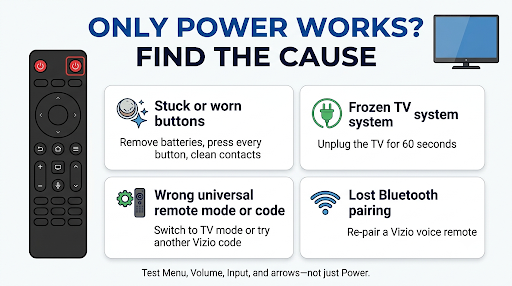
Only the power button works because the power command and every other command are often handled by different parts of the TV. When your TV is off, a small standby circuit stays awake just to listen for the power signal. Once the TV turns on, the main system takes over all the other buttons. If that main system freezes on the Home screen or while loading, the TV wakes up but ignores everything else.
That is the most common reason, but it is not the only one. Here are the causes worth checking:
- A stuck button: If Volume, Input, or another button is jammed down, the remote can keep sending that command and block the others. Vizio’s own support guide calls out Volume Up, Volume Down, Power, and Input as the buttons most likely to cause odd behavior when stuck.
- Weak or badly seated batteries: A dying battery can still fire off a short power press but fail on repeated presses like arrows or volume.
- A frozen SmartCast or Home screen: The TV turns on, the Home screen loads (or tries to), and then the TV stops responding to input.
- Wrong mode or wrong universal remote code: A universal, cable, or streaming stick remote may have a code that only covers power and volume.
- Lost pairing on a voice remote: Vizio voice remotes use Bluetooth for some features, so a dropped connection can leave only part of the remote working.
- Blocked or failing IR sensor: A soundbar, decoration, or bright light can weaken the signal so only some presses get through.
- Worn button contacts: On older remotes, dirt and wear on the rubber pad can stop certain buttons from making contact.
This pattern is not unique to Vizio. Samsung owners report the same thing, and if you have a Samsung set in another room, the steps for Samsung BN59 remote buttons not working while the TV still turns on follow a very similar logic.
Is It the Remote or the TV? Run This 2-Minute Test First
Before you start resetting things, figure out which side has the problem. This saves you from buying a new remote when the TV is the real issue, or factory resetting a TV when the remote just needs batteries.
- Use the buttons on the TV itself. Most Vizio TVs have physical Power, Input, and Volume buttons on the back or bottom edge. If Volume and Input respond, the TV is working and your remote is the suspect.
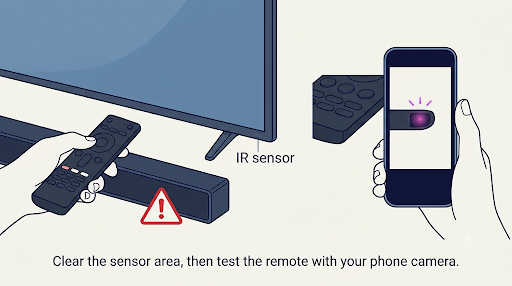
- Do the phone camera test. Open your phone’s camera, point the front tip of the remote at the lens from an inch or two away, and press a few buttons. A flashing light on the screen means the infrared emitter is sending a signal. Test several buttons, not just Power. If Power flashes but the arrows or Volume do not, those buttons are not sending anything.
- Try the VIZIO Mobile app. Vizio offers a VIZIO Mobile app that can control supported TVs over Wi-Fi. If the app controls the TV fine, the TV is healthy and the remote is the problem.
- Test another remote if you have one. If a second Vizio remote or a properly programmed universal remote also fails, the TV’s sensor or software becomes the main suspect.
Pro Tip! Some phone rear cameras filter out infrared light. If you see no flash at all, switch to the front selfie camera and try again before deciding the remote is dead.
| Test Result | What It Means |
| Camera shows flashes for all buttons, TV ignores them | Remote is fine. Focus on the TV sensor, software, or pairing. |
| Camera shows a flash only for Power | The remote has stuck, worn, or dirty buttons. |
| No flash for any button | Batteries, battery contacts, or the remote itself has failed. |
| Phone app and TV buttons both work | The TV is healthy. The remote needs fixing or replacing. |
| Nothing controls the TV after it turns on | The TV software is likely frozen. Start with the power cycle below. |
If your test points to the TV ignoring a remote that is clearly sending signals, the same troubleshooting path covered in our guide on what to do when a TV remote works but the TV does not respond applies here too.
How Do You Fix a Vizio Remote When Only the Power Button Works?
Start with the remote reset and a full TV power cycle, because those two steps fix most cases. Then move down the list only if the problem continues.
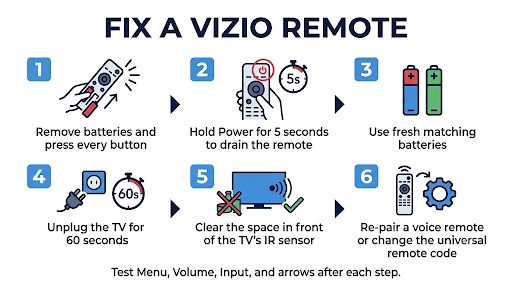
1. Reset the Remote and Free Any Stuck Buttons
This is the official first step from Vizio, and it clears both stuck buttons and leftover charge in the remote’s circuit.
- Remove the batteries from the remote.
- Press and hold the Power button for at least 5 seconds.
- Press every button on the remote once or twice. Pay extra attention to Volume, Input, and the arrow pad.
- Put in a fresh pair of batteries, making sure the + and – ends match the markings in the compartment.
- Point the remote at the TV and test several buttons.
Important Point to be Considered! Use a brand new pair of batteries from the same pack. Mixing one old and one new battery is one of the most common reasons a remote still acts up after a “battery change.”
If a volume key feels mushy or keeps repeating, you may be dealing with a specific button fault. Our walkthrough on fixing Vizio TV remote volume buttons that are not working goes deeper on that one.
2. Power Cycle the TV the Right Way
A real power cycle clears a frozen system, which is the main reason a TV wakes up from the remote but then ignores it. Turning the TV off with the remote is not enough, because the TV only goes into standby.
- Turn off the TV.
- Unplug the power cord from the wall outlet.
- While it is unplugged, press and hold the physical Power button on the TV for 10 to 30 seconds. This drains leftover power from the TV’s circuits.
- Wait about 60 seconds in total.
- Plug the TV back in and turn it on.
- Once the Home screen fully loads, remove and reinstall the remote batteries, then test the remote.
Pro Tip! Plug the TV directly into the wall for this test, not a power strip or surge protector. A faulty strip can cause the TV to restart into a half-working state.
3. Do a Soft Power Cycle From the Menu
If the TV responds to some buttons after the hard power cycle, run a soft restart from the settings too. On most SmartCast models, press the Menu or Gear button, go to System or Admin & Privacy, and select Soft Power Cycle or Restart TV. If the remote still cannot reach the menu, use the VIZIO Mobile app to do it.
4. Clear the Path to the TV’s IR Sensor
Most Vizio remotes use infrared, so they need a clear line of sight. The sensor usually sits along the bottom edge of the TV, either near the center logo or in a lower corner depending on the model.
- Move soundbars, game consoles, picture frames, or decorations that sit in front of the bottom edge.
- Don’t use the remote from behind a cabinet door or glass panel.
- Keep direct sunlight and very bright lamps away from the sensor while you test. Strong light can drown out the remote’s signal.
- Wipe the sensor window and the remote’s front tip with a soft, dry cloth.
A common real-world example: someone mounts a new soundbar right under the TV, and the remote suddenly works only when held at an angle. The power button may still work because you happen to press it from a different spot, like while walking into the room.
5. Check the Remote’s Mode and Universal Remote Code
If power and volume work but Menu, Input, arrows, or app buttons do nothing, a mode or code problem is very likely. This happens a lot with universal remotes, cable box remotes, and streaming stick remotes.
- Older Vizio universal remotes: Some have device buttons or a mode switch (such as TV, DVD, or AUX). Make sure the remote is set to TV.
- Universal and cable remotes: Vizio notes that a code may program the remote but give only limited control. Power and volume may work while menu, app, or voice buttons do not. Go back to the code list and try the next Vizio code until all the main buttons respond.
- Roku, Fire TV, or cable remotes: These often control only power and volume on your Vizio TV through IR or HDMI-CEC. They are not designed to run the Vizio menu, so use the Vizio remote or app for TV settings.
6. Re-Pair a Vizio Voice Remote
If you have a Vizio voice remote (the one with a microphone button), a lost Bluetooth connection can leave some buttons dead, especially after a battery swap or software update. Re-pairing usually fixes it.
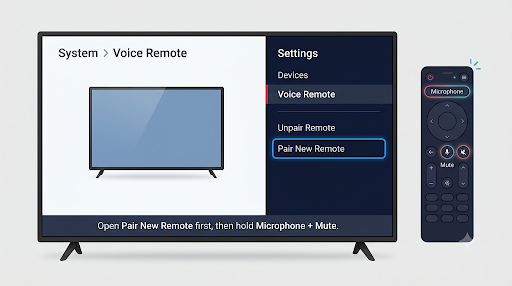
- On the TV, open Menu, go to System, then Voice Remote. Use the TV’s physical buttons or the VIZIO Mobile app if the remote cannot get you there.
- If the remote is still listed, select Unpair Remote first.
- Press and hold the Microphone and Mute buttons together for about 3 seconds, until the light on the remote starts flashing.
- Follow the on-screen prompt to finish pairing, then test all the buttons.
The exact steps can vary a little by remote model and TV year. If pairing keeps failing or the light never flashes, our full guide on fixing a Vizio SmartCast remote that will not pair covers the less common cases.
Important Point to be Considered! Unpairing a voice remote turns off its voice feature until you pair it again. Only unpair it if you are ready to complete the pairing steps right away.
7. Update the TV and the Voice Remote
Outdated software can cause random input lag, frozen screens, and remotes that only half work. On SmartCast TVs, go to Menu > System > Check for Updates. For voice remotes, the same Voice Remote menu also has a Check for Update option. Keep the TV connected to Wi-Fi and powered on while any update installs.
8. Clean the Remote’s Button Contacts
If the camera test showed that Power flashes but other buttons do not, the contacts under those buttons may be dirty or worn. This is common on remotes that are a few years old or have had a drink spilled on them.
- Remove the batteries first.
- Gently clean around the buttons with a soft, dry cloth. Vizio advises against spraying any liquid on the remote.
- For deeper cleaning, some people open the remote’s shell, lift out the rubber button pad, and wipe the contacts with a cotton swab lightly dampened with isopropyl alcohol. Let everything dry completely before reassembling.
Pro Tip! Opening the remote can crack the plastic clips. If your remote is cheap to replace, a new one may be the faster and safer choice.
9. Factory Reset the TV as a Last Resort
If the TV buttons, the phone app, and every remote all fail once the TV is on, a factory reset can clear deeper software problems. This erases your settings, Wi-Fi details, and app sign-ins, so try everything above first.
To reset without a working remote, turn the TV on, then press and hold the Input and Volume Down buttons on the TV at the same time for about 10 to 15 seconds. When a message appears, follow the prompt, which usually asks you to hold Input for about 10 more seconds. The TV will restart into the setup screen.
10. Replace the Remote or Get the TV Checked
If nothing above works, the cause is likely hardware. Here’s how to tell which part:
- The remote is bad if the TV works with its own buttons, the app, or another remote. Vizio says a replacement does not have to look identical. Basic functions generally work across Vizio TVs, though app buttons and advanced features may vary by model.
- The TV’s IR sensor or main board may be failing if no remote works, even one that flashes fine on the camera test. Check your warranty, then contact VIZIO Support or a local TV repair shop.
What Does It Mean If the Remote Light Blinks but the TV Doesn’t Respond?
A blinking light on the remote means the remote is powered and sending something, so the problem is usually on the receiving end. Either the TV is frozen, the signal is blocked, or the remote is not paired to that TV.
On a voice remote, a light that keeps flashing after you press and hold Microphone and Mute usually means it is in pairing mode and waiting for the TV. Finish the pairing from the Voice Remote menu. On a standard IR remote, a blinking light combined with a dead TV points back to the power cycle and sensor steps above.
Why Is My Vizio Remote Still Not Working With New Batteries?
If fresh batteries did not help, the most likely causes are a stuck button, a frozen TV, a blocked sensor, or a lost pairing. New batteries only fix one problem out of several.
Also check the battery contacts inside the remote. White or green crust means a battery leaked at some point. Gently clean the contacts and dry them before inserting new batteries. Also confirm the batteries are the right size and fully seated, since a loose battery can lose contact when you press buttons.
Common Mistakes to Avoid
- Turning the TV off with the remote and calling it a reset. That only puts the TV into standby. You need to unplug it.
- Testing only the Power button after a fix. Power is the one button that already works. Always test Menu, arrows, Volume, and Input.
- Factory resetting too early. A reset wipes your setup and rarely fixes a stuck button or a blocked sensor.
- Buying a new remote before testing the TV. If the TV’s sensor or software is the problem, a new remote will fail the same way.
- Spraying cleaner directly on the remote. Liquid can seep under the buttons and make things worse.
Frequently Asked Questions
Is there a reset button on a Vizio remote?
No, standard Vizio remotes do not have a dedicated reset button. You reset them by removing the batteries, holding the Power button for about 5 seconds, and pressing every button before putting fresh batteries back in. Voice remotes use a button combination for pairing, not a separate reset key.
Can I use my Vizio TV without the remote while I fix this?
Yes. You can use the physical buttons on the TV for power, volume, and input, or control supported models with the VIZIO Mobile app on your phone. The app is also handy for reaching menu settings like restart and pairing when the remote can’t.
Will an old Vizio remote work with a newer Vizio TV?
Usually, yes, for basic controls like power, volume, input, and navigation. App shortcut buttons and voice features may not work on every TV model, so an older remote might only give you partial control on a newer set, or the other way around.
Why does my Vizio remote work only sometimes?
Intermittent response usually comes from weak batteries, light interference near the sensor, or something partly blocking the signal. Try the remote at night with the room lights dimmed. If it works better then, sunlight or a bright lamp is likely washing out the infrared signal during the day.
How do I turn off my Vizio TV if the remote stopped working completely?
Press the physical Power button on the TV, which is usually on the back or along the bottom edge. If the TV is frozen and won’t respond to its own buttons, unplug it from the wall for about a minute and plug it back in.
Final Recommendation
If your Vizio TV remote is not working but the power button works, start with two steps: reset the remote with fresh batteries, then unplug the TV and hold its power button for 10 to 30 seconds. Those fix the majority of cases. If only power and volume work on a universal or cable remote, change the code. If you have a voice remote, re-pair it from the TV menu. And if the TV ignores every remote and even the phone app after waking up, update or factory reset it, then reach out to Vizio Support if the problem sticks around.