
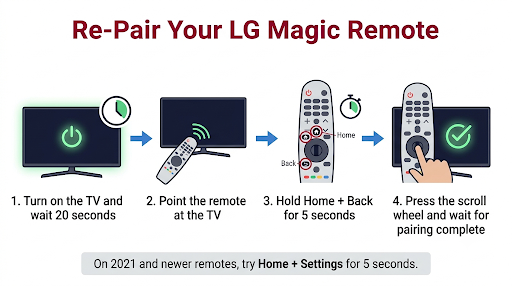
If your LG Magic Remote won’t pair after you changed the batteries, unpair it and register it again. With the TV on, hold Home + Back for 5 seconds until the power light blinks, then point the remote at the TV and press the scroll wheel (OK). On 2021 and newer remotes, you can also hold Home + Settings for 5 seconds to unpair and re-pair in one step.
Most of the time, that’s all it takes. If it doesn’t work, the problem is usually the new batteries, the TV’s Bluetooth needing a fresh start, or the wrong button combination for your remote’s year. This guide covers every one of those, plus how to tell if the remote is actually dead.
Quick Overview
- Check the batteries: Press any button. The power button on the remote should light up. If it doesn’t, use two fresh AA alkaline batteries and check the + and – ends.
- Turn on the TV and wait about 20 seconds before you try to pair.
- Unpair: Hold Home + Back for 5 seconds until the power light blinks.
- Pair: Point the remote straight at the TV and press the scroll wheel (OK) until a pairing message appears.
- 2021 or newer remote? Hold Home + Settings for 5 seconds instead. On 2020 and older remotes with a Guide button, hold Guide for 5 seconds.
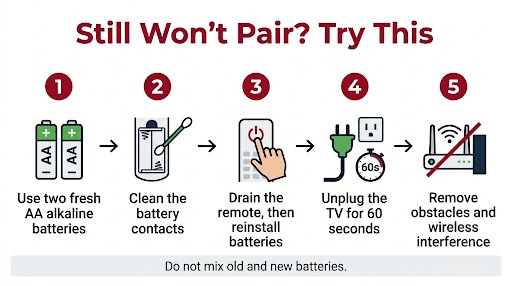
- Still failing? Drain the remote (batteries out, press every button), unplug the TV for 60 seconds, then repeat.
- Last check: Use your phone’s Bluetooth scan to see if the remote shows up as “LGE MRXX.” If it doesn’t, the remote likely needs replacing.
Why Does an LG Magic Remote Stop Pairing After a Battery Change?
The Magic Remote talks to your TV in two ways, and a battery swap can disturb one without the other. It uses infrared (IR) for basic commands and for starting the pairing process. It uses Bluetooth for the pointer, the scroll wheel, and voice control.
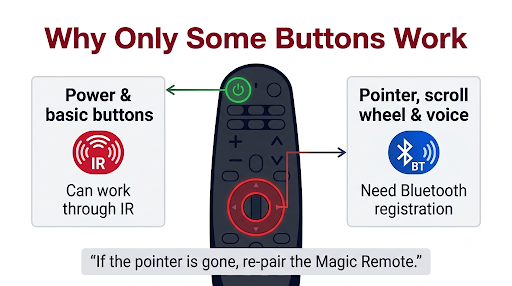
That’s why you might see a strange half-working state after new batteries go in. Power and volume may still work, but the cursor never shows up. LG notes that pointer and voice features require Bluetooth registration, so if that link breaks, the remote can feel “dead” even though it isn’t.
Here are the most common reasons it happens:
- The Bluetooth registration dropped. Pulling the batteries can interrupt the remote’s connection with the TV, especially if you swapped them while the TV was on.
- The new batteries are weak, mixed, or in backward. A brand-new pack can still contain a dud. Mixing an old and new battery also causes trouble.
- Rechargeable batteries. Many rechargeable AA cells run at a lower voltage (about 1.2V) than alkaline (1.5V). The Magic Remote uses more power than a standard remote, so some users find pairing fails until they switch to alkaline.
- Dirty or bent battery contacts. Corrosion from old batteries can block a good connection.
- The TV’s Bluetooth needs a reset. The TV may be holding on to the old pairing session.
- The wrong button combination. LG changed the re-pairing method in 2021, so older instructions may not work on newer remotes.
How Do You Check If the New Batteries Are the Problem?
Press any button on the remote and watch the power button. If it lights up, the remote has power. If it stays dark, the batteries or the contacts are the problem, not the pairing.
Try these quick checks before you move on:
- Take the batteries out and look at the diagrams inside the battery compartment. Match the + and – ends exactly.
- Use two new AA alkaline batteries from the same pack. Don’t mix brands or old and new cells.
- Look at the metal springs and contacts. If you see white or green buildup, gently clean it with a dry cotton swab or one lightly dampened with isopropyl alcohol. Let it dry fully.
- Close the cover firmly. A loose battery door can break contact.
Tip: If your TV shows a “replace the batteries” message even with new ones, swap in a different set. It happens more often than you’d think.
Use Your Phone Camera to Test the Remote’s IR Signal
Here’s a handy trick most guides skip. Open your phone’s camera, point the remote at the lens, and press the power button. On many phones, you’ll see a small flashing light on the screen that your eyes can’t see directly.
- You see a flash: The remote’s IR is working. Pairing should be possible.
- No flash: Try the front camera, since some rear cameras filter IR. If neither shows a light and the power button won’t light up either, the remote may have a power or hardware fault.
How Do You Re-Pair an LG Magic Remote With Your TV?
The standard fix is to unpair the remote, then register it again. Point the remote directly at the TV the whole time, because the TV needs to receive the IR signal to start pairing.
Method 1: Unpair With Home + Back, Then Pair With the Wheel
This method works on most Magic Remotes and is the one LG lists in its official Magic Remote troubleshooting guide.
- Turn on your LG TV and wait about 20 seconds so the system fully loads.
- Stand within a few feet of the TV and point the remote at the screen.
- Press and hold Home and Back together for 5 seconds.
- Let go when the power button on the remote blinks. That means it’s unpaired.
- Press the scroll wheel (OK) button.
- Wait for the on-screen message that says pairing is complete.
If the TV doesn’t register the remote, turn the TV off and back on, then try again.
Method 2: Home + Settings for 2021 and Newer Remotes
LG removed the Guide button from its 2021 Magic Remote, so the re-pairing method changed for 2021 models. On these remotes, one button combo does both steps.
- Turn on the TV and point the remote at it.
- Press and hold Home and Settings together for about 5 seconds.
- The power LED blinks 3 times (unpairing), then stays on (pairing).
- Follow any on-screen instructions until the TV confirms the connection.
Method 3: Hold Guide for Older Remotes
On 2020 and earlier Magic Remotes that still have a Guide button, hold Guide for more than 5 seconds. When the power light blinks 3 times, the old registration is canceled. Then press the scroll wheel to register it again.
Which Pairing Button Combo Works for Your LG Remote?
The right combination depends on your remote’s year. Check the model number on the back of the remote or inside the battery compartment. Names like MR18BA, MR20GA, and MR21GA usually include the model year.
| Remote / TV Year | Example Remote Models | Unpair | Re-pair |
| 2021 and newer (including 2025 AI Magic Remote) | MR21GA and later | Home + Back for 5 seconds | Home + Settings for 5 seconds (unpairs and pairs at once) |
| 2020 and earlier remotes with a Guide button | MR20GA and similar | Home + Back for 5 seconds | Hold Guide for 5+ seconds, then press the wheel |
| Older webOS remotes without a Guide button | MR18BA and similar | Home + Back for 5 seconds | Press the wheel (OK) while pointing at the TV |
| Early Magic Remotes (around 2013) | Older non-webOS remotes | Back + Smart for 5 seconds | Press the wheel (OK) |
Note: LG’s button labels and steps can vary by region and model. If one combo does nothing, try the next one. It won’t harm the remote.
What Should You Do If the Scroll Wheel Press Does Nothing?
If the power light blinks after Home + Back but pressing the wheel never brings up a pairing message, the wheel button itself may not be registering clicks. Press it firmly in the center, not at an angle. Some users find a stuck or worn wheel is the real reason pairing fails.
If clicks feel mushy or the wheel doesn’t scroll either, see our guide on fixing an LG Magic Remote scroll wheel that won’t work. On 2021 and newer remotes, the Home + Settings method is a good workaround because it doesn’t need a wheel press to start pairing.
What If the Remote Still Won’t Pair After a Reset?
If the standard reset fails, clear out leftover power in both the remote and the TV. This forces both devices to start fresh.
Step 1: Drain the Remote’s Residual Power
- Remove both batteries.
- Press and hold the power button for about 5 to 10 seconds.
- Press every other button once or twice. Users on LG owner forums report this alone has fixed stubborn pairing problems.
- Leave the batteries out for a few minutes.
- Put the batteries back in and try pairing again.
Step 2: Power Cycle the TV
- Unplug the TV from the wall outlet. Turning it off with the remote isn’t enough, since the TV just goes into standby.
- Wait 60 seconds. If your TV has a physical power button, hold it for about 15 seconds while unplugged.
- Plug the TV back in, turn it on, and wait about 20 seconds.
- Repeat the unpair and pair steps above.
Step 3: Remove Interference and Obstacles
LG recommends using the remote within about 33 feet (10 meters) of the TV. During pairing, stand much closer than that.
- Clear anything blocking the bottom of the TV, where the IR sensor usually sits. Soundbars are a common culprit.
- Temporarily move or turn off nearby wireless devices, such as Wi-Fi routers, Bluetooth speakers, or a running microwave.
- Check that no tape, sticker, or protective film covers the TV’s IR sensor.
Power and Volume Work, But the Cursor Doesn’t. Is It Paired?
No. If basic buttons work but the pointer never appears, the remote is sending IR but isn’t connected over Bluetooth. The fix is still to re-pair it using the methods above.
Once it’s paired, give the remote a gentle shake left and right. That should wake up the pointer. If you can see the cursor but it’s frozen or won’t follow your hand, check our walkthrough for an LG Magic Remote cursor not moving. And if the pointer shows up and then keeps vanishing a few seconds later, here’s what to do when the LG Magic Remote pointer disappears.
How Can You Tell If the Magic Remote Is Broken?
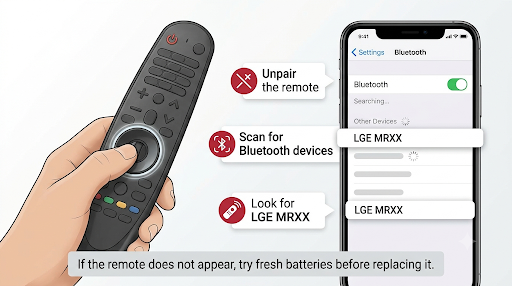
Use your smartphone to test whether the remote is sending a Bluetooth signal. This is LG’s own diagnostic step, and it settles the “is it the remote or the TV?” question.
- Turn on the TV and unpair the remote by holding Home + Back for 5 seconds.
- Turn the TV off, so it doesn’t grab the remote again.
- On your phone, turn on Bluetooth and open the screen to scan for new devices.
- Press the OK (wheel) button on the Magic Remote while the phone is scanning.
- Look for a device named LGE MRXX (or something starting with “LGE”).
Don’t pair your phone with the remote. You only need to see the name.
| What You See | What It Means | Next Step |
| LGE MRXX appears on your phone | The remote’s Bluetooth works | The TV is the issue. Power cycle it, update its software, or contact LG. |
| Nothing appears | The remote isn’t sending Bluetooth | Try new batteries once more. If it still fails, replace the remote. |
| TV shows “Bluetooth Initialization Failed” | The TV’s Bluetooth module has a fault | LG says the TV will need service. |
Could a TV Software Problem Stop the Remote From Pairing?
Yes. If the remote shows up in the phone test but still won’t pair, the TV’s software may be the problem. This is especially likely if pairing trouble started around the same time as a webOS update.
To check for an update without the Magic Remote, use the buttons on the TV itself or the free LG ThinQ app on your phone, which can work as a temporary remote when the TV and phone are on the same Wi-Fi network. For update-related fixes, see our guide on an LG TV remote not working after a software update.
Common Mistakes That Stop an LG Magic Remote From Pairing
- Trying to pair right after turning on the TV. Give it about 20 seconds to fully boot.
- Pointing the remote away from the screen. Pairing starts over IR, so the remote needs a clear line of sight to the TV.
- Letting go of the buttons too soon. Hold for a full 5 seconds, and wait for the power light to blink.
- Using the wrong combo for your remote’s year. Home + Settings won’t behave the same way on an older remote with a Guide button.
- Mixing old and new batteries. Always replace both at once.
- Using a replacement remote that doesn’t match your TV. Some newer Magic Remotes aren’t supported by older TVs. If you see “this remote is not supported by this TV,” check that the remote model is listed as compatible with your TV’s model year.
- Pairing with another LG TV nearby. If two LG TVs are close together, the remote may register with the wrong one. Turn off the other TV first.
Frequently Asked Questions
Why is my LG remote blinking red after I put in new batteries?
A blinking light right after you hold the pairing buttons is normal. It means the remote is unpairing or searching. If it keeps blinking and never connects, the TV likely didn’t receive the signal. Move closer, point at the bottom of the TV, and try again. If the light blinks weakly or not at all, swap the batteries again.
Do I need to re-pair my LG Magic Remote every time I change the batteries?
Usually not. The remote should reconnect on its own after a battery swap. Re-pairing is only needed when the connection drops, which can happen if the batteries were weak for a long time or the swap interrupted the Bluetooth link.
Can I pair an LG Magic Remote without the scroll wheel working?
On 2021 and newer remotes, yes. Holding Home + Settings for 5 seconds starts the unpair and re-pair process without a separate wheel press. On older remotes, the wheel press is part of registration, so a broken wheel can block pairing.
How long does an LG Magic Remote take to pair?
Once the TV is fully on, pairing normally takes just a few seconds. You’ll see a confirmation message on screen. If nothing happens after about 10 seconds of pressing the wheel, start the process over.
Can I use one Magic Remote with two LG TVs?
A Magic Remote registers with one TV at a time. If you pair it with a second TV, it will usually lose its connection to the first. Keep one remote per TV to avoid repeated pairing problems.
Will a factory reset on the TV fix the pairing problem?
It can, but treat it as a last resort. A factory reset erases your apps, accounts, and settings. Try the remote drain, the TV power cycle, the phone Bluetooth test, and a software update first.
Where can I buy a replacement LG Magic Remote?
LG sells genuine Magic Remotes through its TV accessories store, and they’re also available from major retailers. Match the remote to your TV’s model year, since support varies. Before you buy, run the phone Bluetooth test to confirm the old remote is really the problem.
Final Recommendation
Start simple. Put in two fresh AA alkaline batteries, turn on the TV, wait 20 seconds, then hold Home + Back and press the wheel. If you have a 2021 or newer remote, try Home + Settings instead.
If that fails, drain the remote, unplug the TV for 60 seconds, and try once more. Still stuck? Run the phone Bluetooth test. If “LGE MRXX” doesn’t appear, the remote needs replacing. If it does appear, the TV is the issue, so update its software or contact LG Support for service.